
TL;DR
- The official starting point for an Instagram ad library search is Meta Ad Library, which includes Instagram advertising alongside other Meta platforms.
- Choose a relevant country and ad category, search the advertiser, and narrow to Instagram using the available platform filter or the platforms shown on an ad record.
- An Instagram-shaped video, a public Reel or an advertiser's feed does not by itself prove a paid Instagram placement.
- Compare a small set under the same market and research scope. Record the hook, proof, offer and source rather than declaring a competitor's ad profitable.
- When you find a reference worth retaining, use MyAdLibrary's Instagram Ad Downloader with its supported individual link. Keep source notes separately.
If you want to see what a competitor advertises on Instagram, begin with Meta Ad Library. Scrolling the competitor's Instagram profile shows public content, but it is not a reliable substitute for identifying paid ad records.
This Instagram ad library guide helps you find relevant records and turn them into a useful comparison. The goal is a short, traceable research set: which advertiser, which market, which creative, and what you can actually observe.
Where is the Instagram ad library?
Meta provides the shared Ad Library rather than a separate official Instagram-only archive. Meta describes its library and expanded access to advertising information in its ad transparency announcement.
The practical distinction is between an advertiser's public content and its advertising records. A public post can supply a creative reference. An ad record supplies evidence that a creative is represented in the advertising library. The listed platforms help you determine whether Instagram is part of that record.
| Source | Best use | What to avoid assuming |
|---|---|---|
| Meta Ad Library | Find ad records and inspect their listed platforms | Every historical commercial creative remains available |
| Instagram profile | Learn how a brand presents itself and find public content | Every post has been promoted |
| An ad encountered in your feed | Identify a paid creative you were shown | Your feed represents every ad or audience in the market |
| A locally saved video | Replay the creative's delivery and structure | The file preserves the complete campaign context |
Use MyAdLibrary for the downloading and reference workflow once you have selected a source. Discovery and file collection are separate steps.
Step 1: define a market and a question
Choose the country relevant to your research in Meta Ad Library. Use the appropriate ad category for the task; for an ordinary product comparison, select the general ads category available in the interface. Category and archive rules can differ, so avoid assuming a political-ad archive behaves like a commercial search.
Write one question before collecting examples. “How do these brands demonstrate a storage product?” leads to a manageable set. “Find all their best ads” leaves both the sample and the meaning of “best” undefined.
Keep the scope consistent across competitors. If one search uses a different country or category, label it as a separate observation. You can compare the creative ideas, but the records no longer represent the same search conditions.
Step 2: identify the advertiser
Search the advertiser or a relevant keyword, then choose the result that matches the business you intend to study. Compare the page identity and associated links with the brand's known website or account.
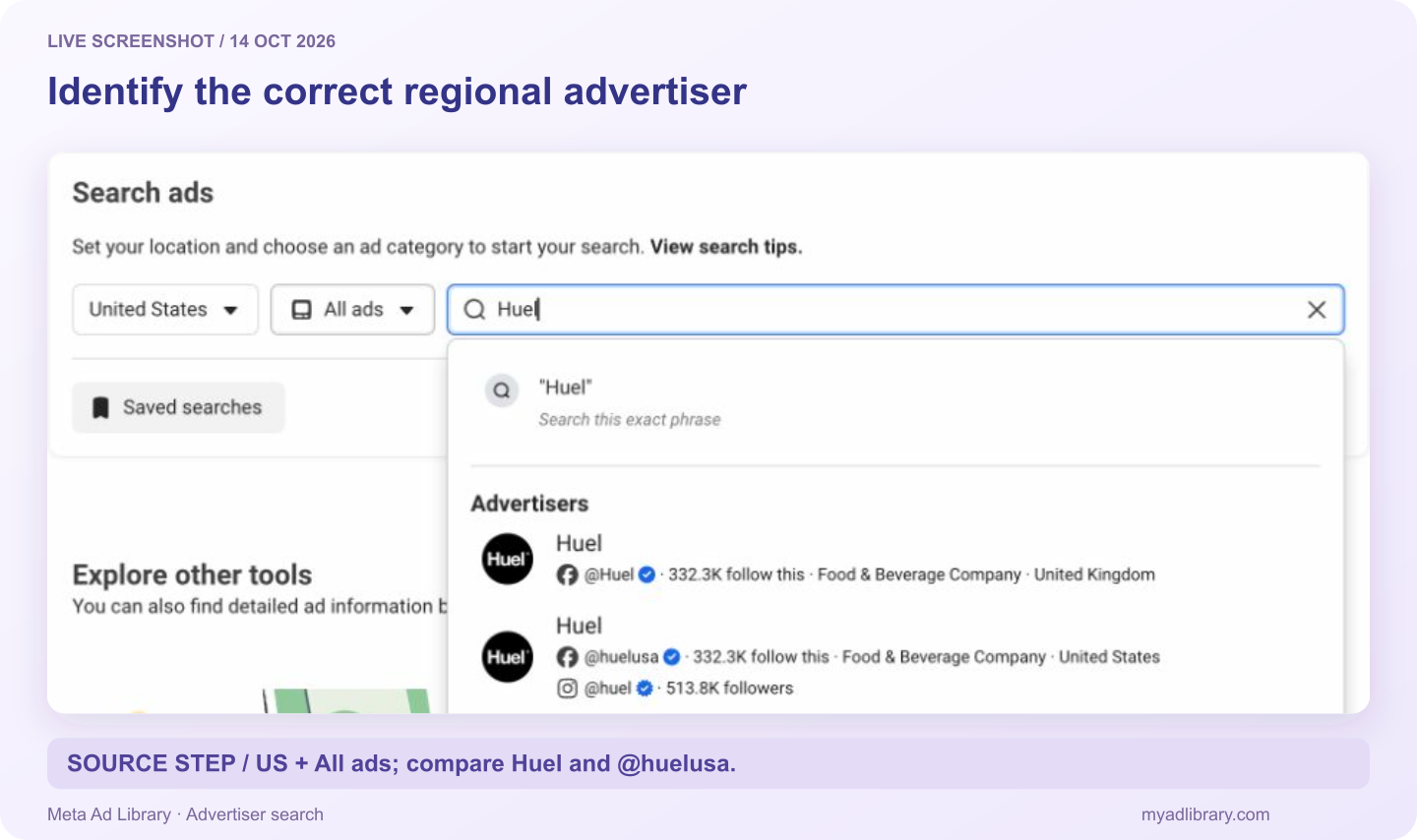
Live search captured October 14, 2026. We selected the @huelusa match for this US example. Similar advertiser names and regional pages should be checked before attributing the results.
If a familiar brand name produces little useful content, try a closely related business or page name you can verify. A retailer, regional page or parent business may use a different visible identity. Treat that as something to check, not a reason to merge every similar name into one competitor.
Open an individual record and retain its URL or Ad ID. Search results can change; an individual reference helps you find the exact example discussed in a brief.
Step 3: check Instagram placement
Use the library's platform filter for Instagram where it is available. Also inspect the platforms shown on the particular ad record before labeling the reference.
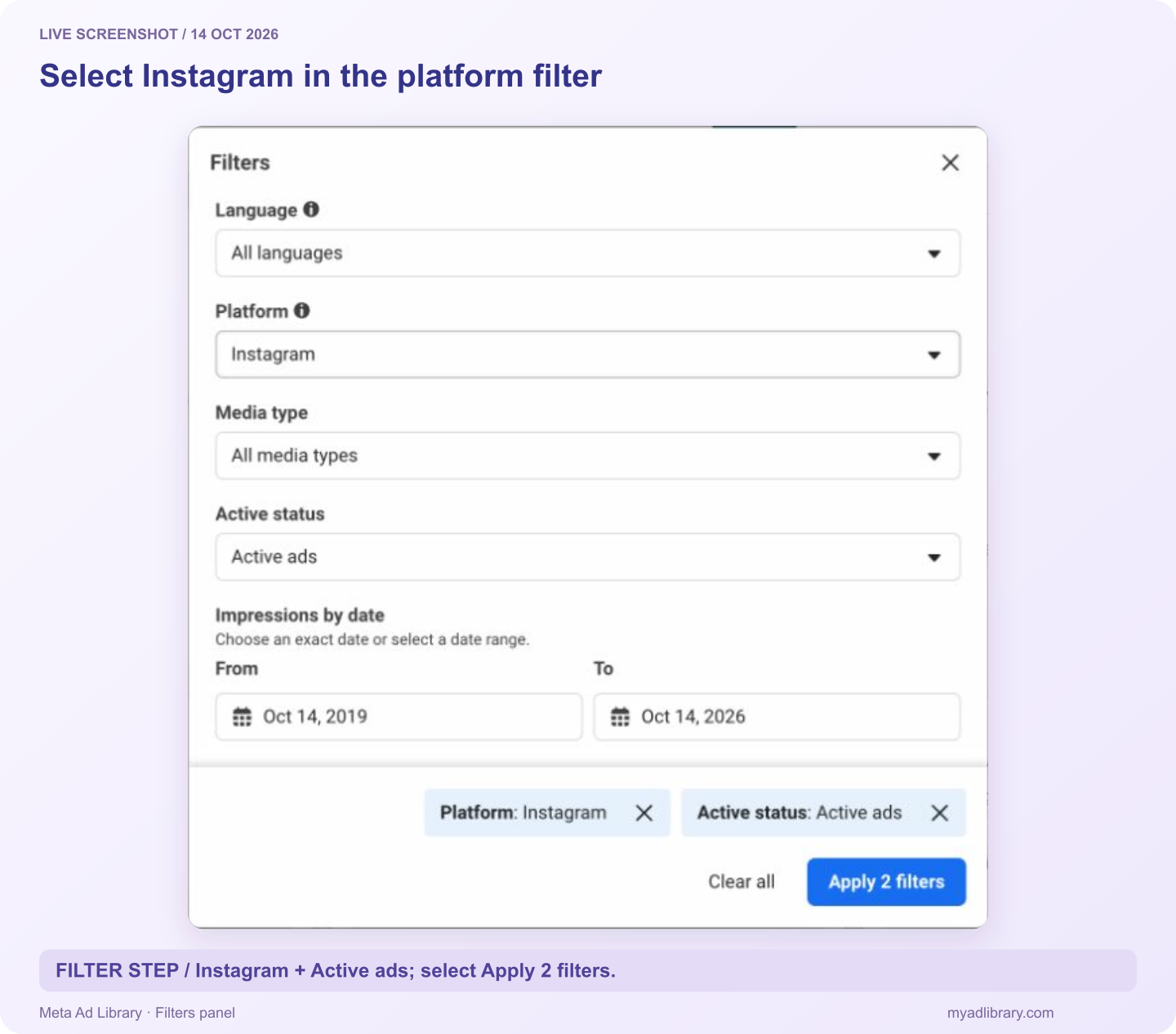
In the captured interface, open Filters, set Platform to Instagram, close the platform menu, and select Apply 2 filters. The second filter here is Active ads; the count depends on your selected settings.
A vertical video can be used on more than one platform. Its shape is a creative property, not evidence that it ran in Instagram Stories or Reels. Likewise, Instagram listed on a record does not automatically establish the exact placement you personally saw.
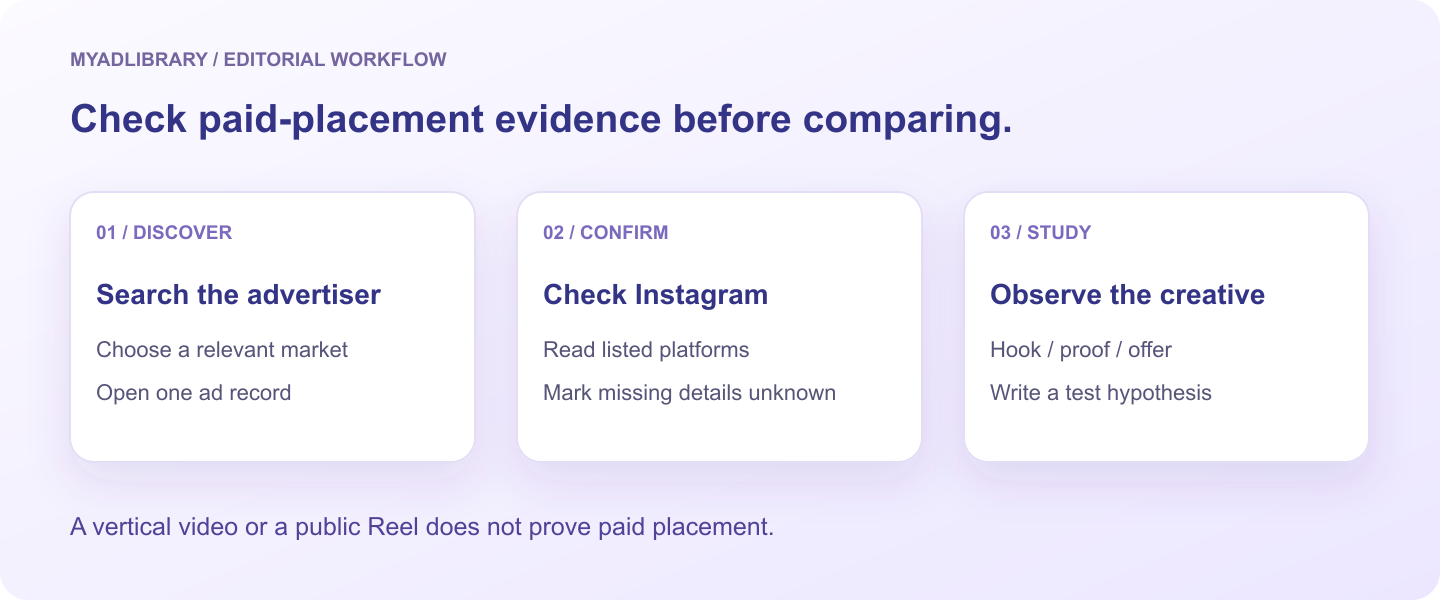
Separate what the record establishes from what the creative suggests. Use “placement not confirmed” when the needed detail is absent.
Some records list several platforms. Keep that context. It may explain why the same creative appears in a broader Meta search and an Instagram-focused collection. Avoid describing a multi-platform ad as exclusive to Instagram.
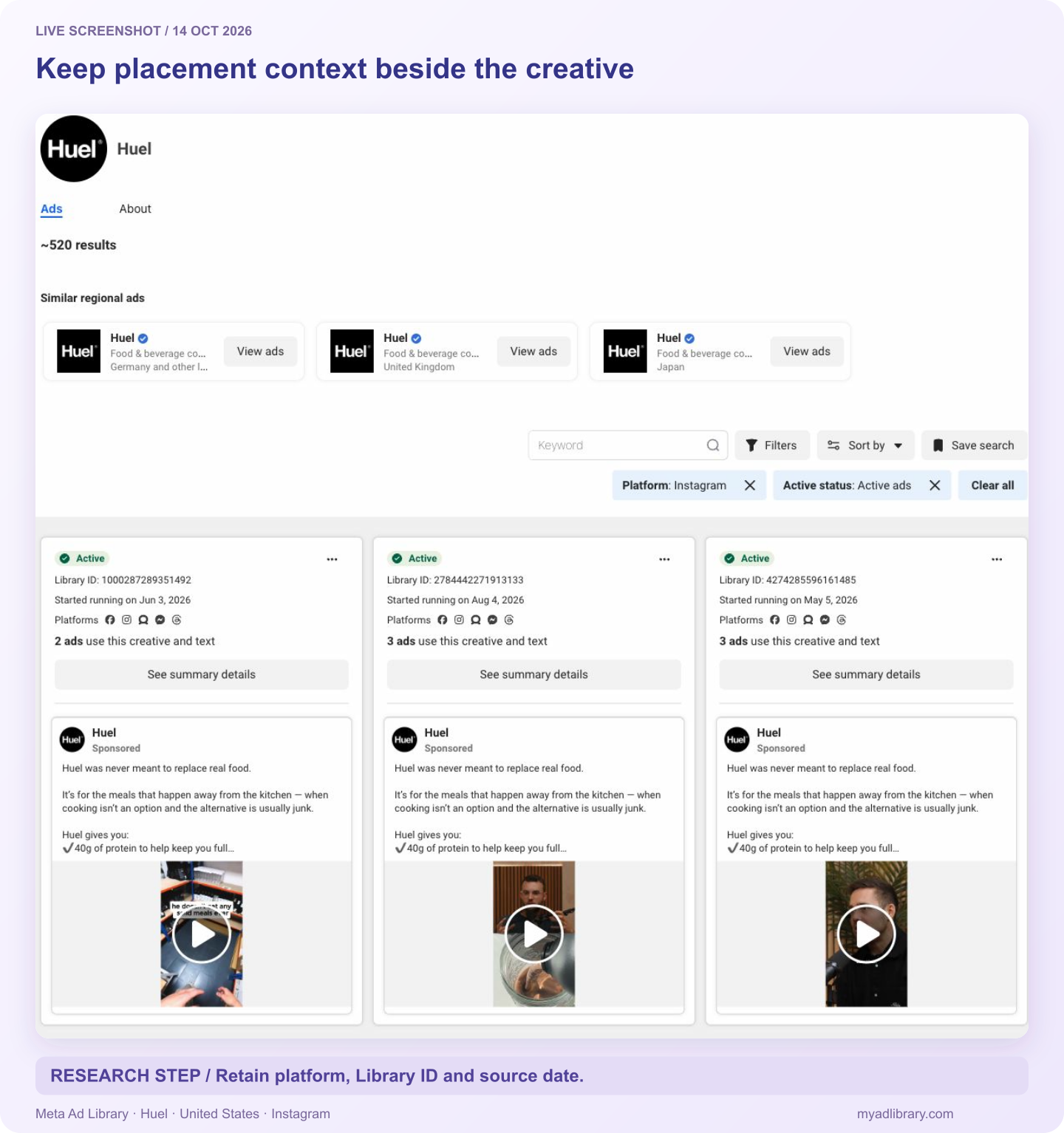
Actual filtered results captured October 14. The three displayed records retain their Library IDs and platform icons. The advertiser's claims and visible result count are source content, not independently verified product results or performance evidence.
Step 4: compare creative decisions consistently
Choose a small starting set, such as three distinct creatives per advertiser. This is an editorial method for keeping the task manageable, not a representative sample or a product limit.
Replay each example and fill the same fields:
| Research field | Useful question |
|---|---|
| Opening | What does the viewer see or hear first? |
| Audience cue | Who is addressed, and which problem is named? |
| Product demonstration | What is visibly shown rather than only claimed? |
| Evidence | Is there a demonstration, comparison, testimonial or explanation? |
| Offer | What is being offered, and under what visible conditions? |
| Action | What next step does the creative ask the viewer to take? |
| Source context | Which advertiser, market, record and capture date identify it? |
For a carousel, review the card order. A product shot followed by a size explanation and a final offer creates a different argument from three unrelated images. For a video, note when the product, proof and action appear. You can study that structure without adopting the competitor's words or claims.
Deduplicate carefully. Two records might use similar footage with different text or offers. Label them as variations when your question concerns messaging. If your question concerns visual composition, avoid counting every repeated version as a new creative idea.
What the library can and cannot tell you
An Instagram ad library search helps you observe creative and advertising context available in the records. It does not give you the competitor's complete account performance.
An ad's presence in a library is evidence of visibility, not evidence of profitability. A start date or recurring creative can inform a research question, but neither establishes conversion rate or return on ad spend.
Write observations and hypotheses separately:
- Observation: “Two selected ads show the product in use before introducing the offer.”
- Hypothesis: “An early demonstration might make our own explanation easier to understand.”
- Your test: “Compare an early demonstration with our current opening using our own campaign data.”
Do not assume the search reproduces every personalized feed experience. Availability, country, category and the advertiser identity you selected all affect what you can inspect. If a field is missing, mark it unknown rather than borrowing a number from a different record.
Step 5: retain the references worth revisiting
After selecting an ad, copy its individual Meta Ad Library URL. The Instagram Ad Downloader supports that detail link as well as supported Instagram content links. Our Instagram download tutorial explains how to choose video, cover, image or carousel actions after retrieval.
Keep the source record even if you also download a file. The file shows the media; the record supplies context that may not be included in an exported asset. If retrieval fails, retain the link and notes so the comparison remains useful.
For an account collection, Swipe File requires login. Do not assume that clicking a browser download also creates an account entry. The swipe file introduction explains the difference between a reference collection and loose saved media.
To compare the same competitors across platforms, use the YouTube ad library guide. Maintain separate platform evidence and search conditions for each set.
When you cannot find the expected ad
| Situation | Next check |
|---|---|
| The brand search returns unrelated advertisers | Verify the page identity against a known account or website |
| You see Meta ads but cannot identify Instagram examples | Inspect the platform filter and each record's listed platforms |
| An ad you remember is absent | Check market/category and advertiser identity; do not assume complete historical coverage |
| Several records seem identical | Compare copy, offer and source IDs before deciding whether they are duplicates |
| A Reel is public but no paid record is found | Label it as a public creative reference with paid status unconfirmed |
If the exact creative remains unavailable, document that limit and choose another accessible reference for your analysis. Reconstructing an ad from memory can introduce errors into a brief.
FAQ
Is the Instagram ad library free?
Meta Ad Library is a public discovery source. MyAdLibrary's separate Instagram downloader offers a free starting workflow for supported individual links. Source availability and tool usage conditions still apply.
Can I find competitor Instagram ads without browsing their feed?
Yes. Search the advertiser in Meta Ad Library and use available platform information to identify Instagram records. This gives you a more purposeful research path than waiting for the competitor to appear in your personalized feed.
Does the library show only Instagram ads?
No. Meta's library covers multiple Meta platforms. Narrow to Instagram and retain the platform context shown on the record.
Can I identify winning ads from run duration?
Run duration can be recorded as context, but it does not establish sales, profitability or suitability for your audience. Use the creative to develop a hypothesis, then measure your own test.
Can I download an ad after finding it?
Use the supported individual link in the Instagram downloader and inspect whatever media is returned. Successful retrieval depends on the source. Downloading also does not grant permission to republish someone else's creative.
Turn discovery into a usable reference
Find one relevant record in Meta Ad Library, confirm its Instagram context, and record a visible creative choice. Then use the Instagram Ad Downloader if you need an available file to revisit. A small set with clear sources and observations gives a creative team something concrete to discuss.