

TL;DR
To find competitors' Facebook ads, open Meta Ad Library, select the country and All ads, then search for the brand and select its advertiser entry. Confirm the Page identity, set Active ads, and narrow the platform only if your research is Facebook-specific. A keyword results page can include retailers and unrelated advertisers mentioning the same brand.
Once you find a useful ad, keep its library link and your research notes. Use the Facebook Ad Library Downloader to retrieve available media for a closer review. Public creative activity provides ideas to investigate; it does not establish a competitor's sales, targeting strategy or return on ad spend.
Start with the decision your research needs to support
“What are our competitors doing?” is too broad to produce a useful brief. Choose a question that you can answer from visible creative, such as how other subscription brands explain value, how retailers introduce a new collection, or which objections appear in demonstration videos.
Select a small group of relevant advertisers. Include a direct competitor serving the same customer, and optionally an adjacent brand whose creative format you want to study. Keep those roles separate in your notes. A large retailer and a niche subscription service may be useful references for different reasons.
For each brand, record the expected Facebook Page, market and product category. This preparation prevents a common error: spending half an hour analyzing a reseller's ads because it uses the brand name in its copy.
Step 1: choose an advertiser, not just a keyword
In Meta Ad Library, choose the country you want to research and All ads. Type the competitor's name into the search field. Review the advertiser suggestions before pressing Enter or choosing an exact-phrase search.
Select the entry matching the brand's Page name and handle. Regional Pages, product divisions and similarly named businesses may appear beside it. Follower counts can help distinguish entries, but the identity and connection to the brand matter more than the largest number.
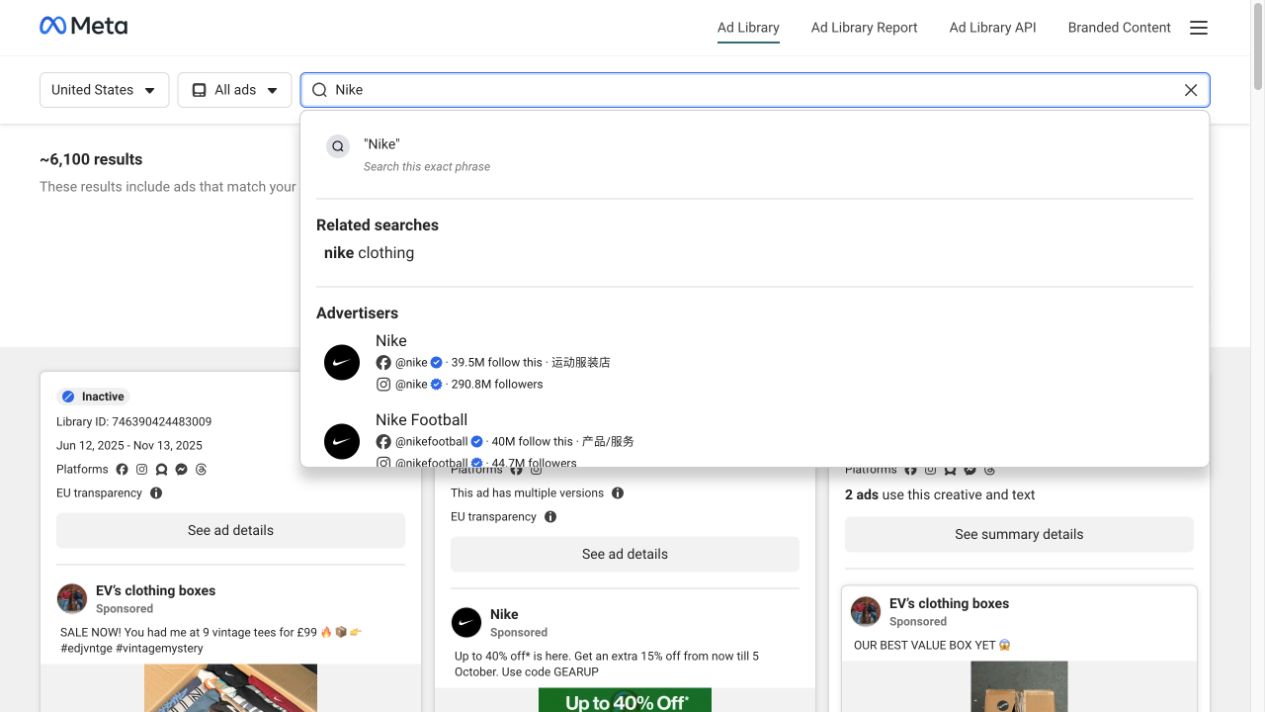
Live Meta Ad Library capture, November 6, 2026. The visible suggestions distinguish the Nike advertiser from Nike Football. Selecting an advertiser changes the scope of the search.
If the name is ambiguous, cross-check the Facebook link from the competitor's own website. An advertiser's ordinary Page and its Ad Library view are related but serve different purposes: one shows public Page content; the other provides paid-ad records.
Our live research demonstrated why this distinction matters. A keyword search for “nike clothing” returned ads from several advertisers, including ThreadBeast and Whatnot. Selecting the Nike advertiser opened a Page-specific view. Those are different research sets, even though both searches involve Nike.
Step 2: make the scope visible before comparing ads
On the advertiser page, confirm the country, category and active-status filter. Clear any leftover keyword, language, media-type or date restrictions that do not belong to your current question.
Meta Ad Library covers ads across Meta technologies. If you specifically need Facebook placements, use the platform filter. If you want the brand's broader Meta creative approach, keep all platforms and label the collection accordingly. Do not describe an all-platform selection as Facebook-only.
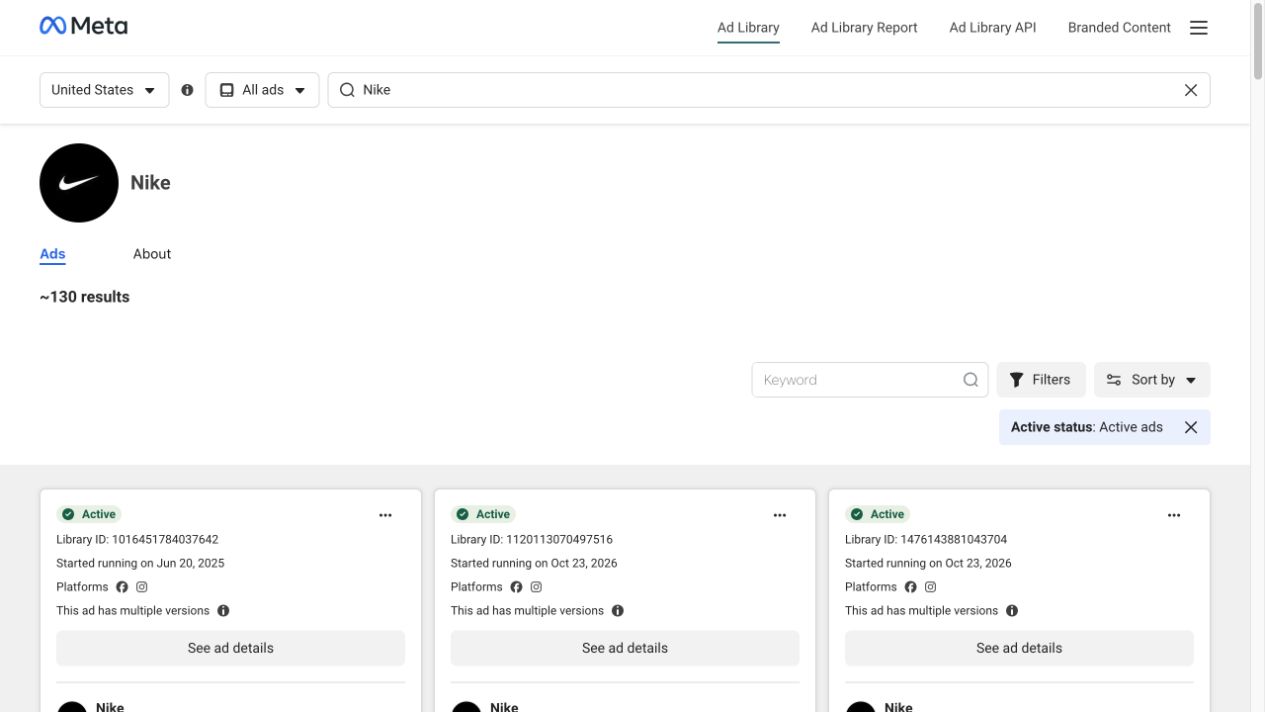
Live capture, November 6, 2026. This Nike Page view displayed approximately 130 results with United States and Active ads selected. It is a dated, filtered observation—not a permanent or worldwide brand total.
Open a few relevant records using See ad details. Note the Library ID, status, displayed start date, creative format and destination when available. Pay attention to labels indicating multiple versions: one preview may not represent every version attached to the record.
Use the same research conditions for each competitor. Comparing one brand's videos in one country with another brand's all-media results across a different scope creates differences that may come from your filters rather than their strategy.
Step 3: compare the message behind the format
A folder of screenshots is useful only when you can explain what each reference contributes. Review the creative in layers:
| Layer | What to record | Question for your own brief |
|---|---|---|
| Opening | The first visible promise, scene or question | How quickly does the viewer understand the problem? |
| Benefit | The outcome the ad emphasizes | Which outcome can our product genuinely support? |
| Proof | Demonstration, comparison, testimonial or specific detail | What evidence could we show ourselves? |
| Offer | Price, bundle, trial or promotion, when visible | Is the offer central to the idea or incidental? |
| Action | CTA and destination type | Does the next page continue the same promise? |
Describe what you can see before interpreting it. “The video demonstrates assembly before showing the offer” is an observation. “The advertiser discovered that assembly anxiety is the main conversion barrier” is an inference that the library cannot confirm.
For an illustrative review, imagine three ads all promoting a meal subscription. One leads with preparation time, one with a finished meal and one with price per serving. The useful takeaway is a set of distinct angles to consider. The library does not tell you which angle generated the most purchases.
Repeated creative or an old start date can justify closer inspection. Neither proves an ad is a winner. You do not know its delivery continuity, spend allocation, audience mix or business results from that signal alone.
Step 4: save the reference together with its context
For an individual reference, copy its Meta Ad Library URL containing the ad's id= value. Keep that link alongside the capture date, advertiser and filter notes. A media file without its source is harder to verify or revisit.
Paste the real ad link into the Facebook Ad Library Downloader, select Find media, and review the available result. Downloading has a free entry without signup, subject to availability and usage allowances. Saving into an account-based Swipe File is a separate signed-in workflow.
If you need several ads from one advertiser, use the advertiser's library URL rather than the regular Facebook Page URL. Our guide to bulk downloading Facebook ads from one advertiser covers that collection workflow. For preserving copy and source information, use the Facebook ad copy and source-details guide.
Keep the batch focused on the research question. A few representative ads with clear notes can be more useful in a creative meeting than a large set of nearly identical variations.
Turn the research into an original test brief
For each promising pattern, write four short lines: the observed technique, why it might be relevant to your customer, the original execution you could produce, and the outcome you will measure in your own campaign.
For example, “Demonstrate setup before introducing the price” could become a short video of your own product being assembled by a first-time user. The reference informs the sequence; your product, claims and footage supply the execution.
Set aside ideas that require evidence you do not have. A competitor's customer quote, performance claim or price comparison cannot simply become your own. Public visibility makes the ad available for research; it does not supply permission to reuse its assets.
Use MyAdLibrary to keep useful creative references accessible, then judge the resulting ideas with your own campaign data.
FAQ
Can I see all of a competitor's Facebook ads?
You can inspect the ads Meta makes available for the selected advertiser and search conditions. A brand may use multiple Pages, and historical coverage varies. One advertiser result should not be presented as a complete company-wide archive.
Why do other companies appear when I search a brand name?
A keyword search can match the brand name in another advertiser's creative. Select the intended advertiser entry and verify its Page identity to narrow the view.
Can I find competitors' targeting and ROAS?
Do not infer complete targeting settings or ROAS from ordinary public ad creatives. Some ad categories and regions provide additional transparency information, but it is not a substitute for the advertiser's campaign reporting.
Should I copy a competitor's longest-running ad?
Use it as a reference to analyze, not a performance guarantee. Identify a technique you can adapt with your own evidence and assets, then test it against your own objective.