
TL;DR
- An ad swipe file is a deliberately chosen collection of advertising references, kept with the context and observations that make them useful later.
- MyAdLibrary's Swipe File shows saved ads as visual cards. Opening a card reveals the creative alongside details such as advertiser, Ad ID, copy, CTA, and original-ad link when available.
- Start with one creative question and a small collection. Save the reference, record why it matters, and use it to brief an original execution.
- The free Facebook and TikTok downloaders help you keep local media. The account-based Swipe File requires login; downloading a file and saving an account entry are separate actions.
- A useful collection explains what to learn from an example. A card's activity status or running time does not prove its return on ad spend.
You are writing an ad and remember an example with a clear opening, but all you have is a screenshot called image-17. You cannot find the original, the advertiser, or the reason you saved it. An ad swipe file solves that problem by keeping the example and its context together.
This guide shows what belongs in a swipe file, how to read MyAdLibrary's saved-ad screens, and how to build a first collection that helps with an actual creative brief.
What makes a collection an ad swipe file?
An ad swipe file can be a product workspace, a folder with an accompanying sheet, or a small research document. The defining feature is that you can retrieve an example and explain the creative choice worth studying.
Save material that helps answer a concrete question: how a headline names an audience, how a demonstration establishes proof, how a carousel sequences an offer, or how a video transitions into its CTA. The reference is useful because of that decision, not simply because the design looks polished.
Consider three ways to store the same example:
| Saved item | What it gives you | What to add |
|---|---|---|
| A bookmark | A route back to the source while it remains available. | A description and a captured reference if needed. |
| A downloaded video | Media you can replay locally. | Advertiser, original link, date, and your observation. |
| A documented swipe-file entry | Creative plus context and a reason to revisit it. | A new test idea when a relevant brief arrives. |
An ad swipe file becomes useful when a saved example can answer a future creative question. It does not need a large number of entries to do that well.
What MyAdLibrary's populated Swipe File looks like
After you log in and have saved ads in your account, Swipe File displays a visual collection. In the example below, cards show brand names, platform marks, status indicators, and creative previews. Several cards belong to the same advertiser, which is useful when comparing different executions.
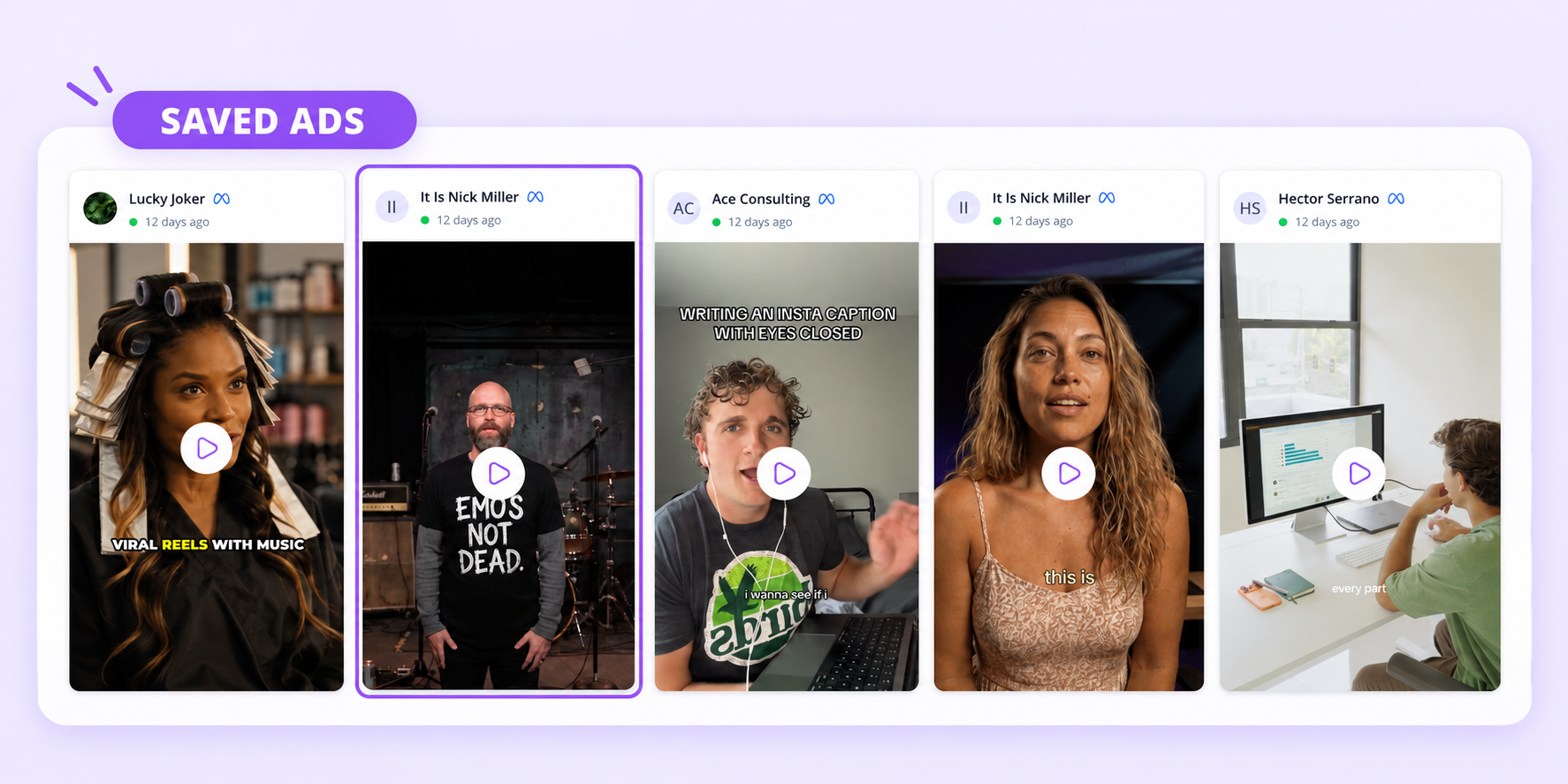
This example shows a populated account collection of Facebook ads. A new account may have an empty collection until ads are saved.
Use the grid as a visual starting point. Identify a relevant card, open it, and inspect the creative before deciding what to learn from it. A preview image can suggest a format, but it cannot show the complete video or all the surrounding copy.
For example, two cards from the same advertiser might both use a person speaking to camera. Watch them before assigning the same hook label: one may open with a problem, while another leads with a result. Similar appearance is not enough to establish that the creative approach is identical.
Open an ad and read its details
The detail view places the media beside a structured information panel. The saved example below shows a Facebook video from It Is Nick Miller, with its copy and destination information. Use the player to inspect the creative, then connect what you see with the fields on the right.
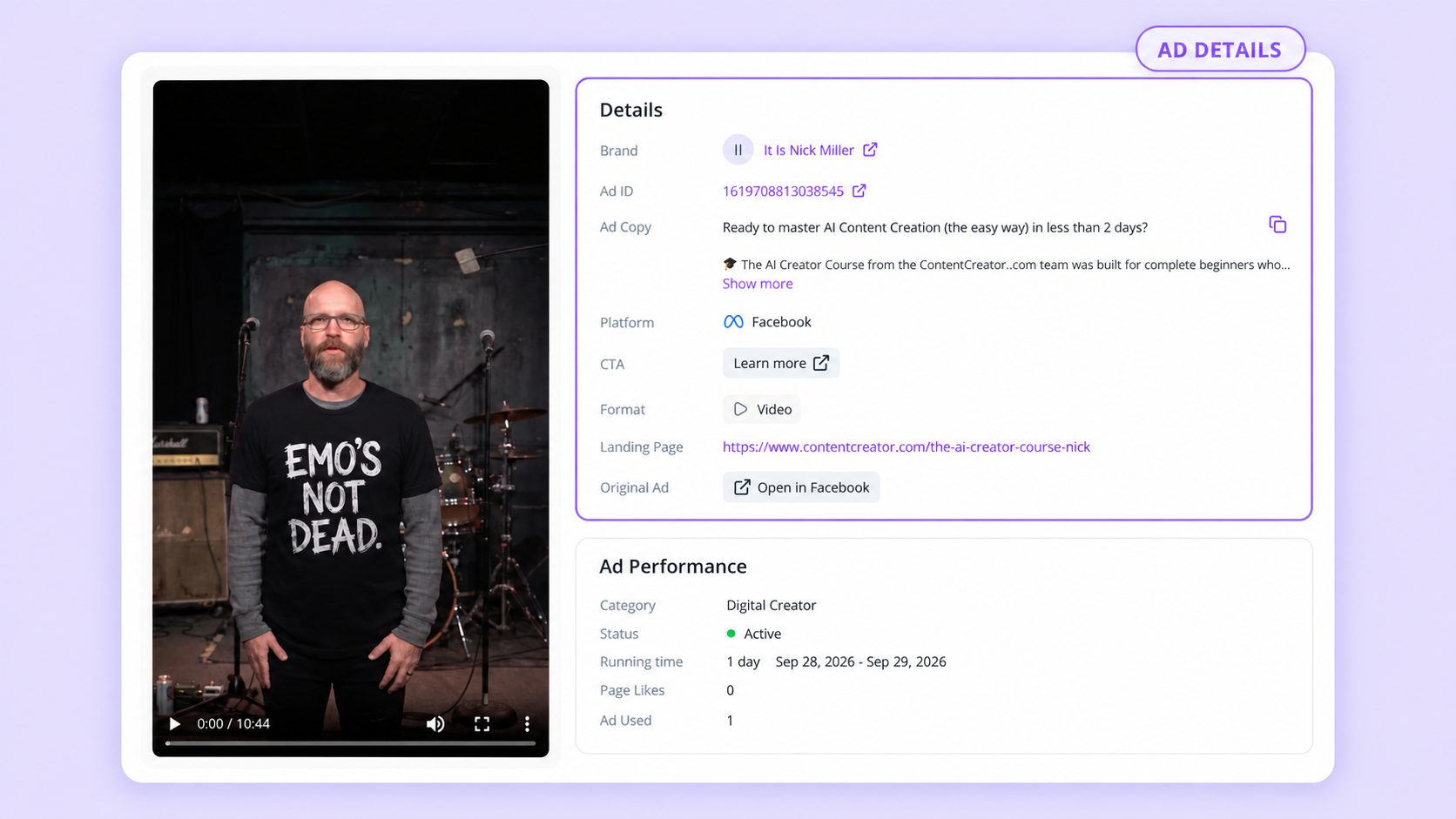
Available information depends on the saved source. The labels help you distinguish creative content, attribution, and snapshot context.
| Detail | How it helps your research |
|---|---|
| Brand and Ad ID | Identify the reference and distinguish it from other ads by the same brand. |
| Ad Copy | Read the written promise and objections addressed. Use Show more for truncated text and the copy control when you need it in your notes. |
| Platform and Format | Record the placement context and whether you are studying video, image, or multiple assets. |
| CTA | Identify the action the ad asks the viewer to take. |
| Landing Page | Keep the destination with the ad so you can later examine the continuity of the message. |
| Original Ad | Return to the public source through Open in Facebook when available. |
Start by reading the copy, then watch the media. Note where they reinforce each other and where they supply different information. The screenshot's copy addresses beginners and makes a time-related promise; the visible CTA invites the reader to learn more. Those are observable messaging choices. Whether that promise is convincing to the intended audience is a question to investigate.
The Ad Performance panel contains status, running time, and other context fields in this example. Treat them as details of the displayed record. They do not provide a conversion report. A label saying Active is not enough to call an ad a winner, and a displayed count needs its own definition before it can support a comparison.
Build your first collection in five steps
1. Choose one question
Write a question you expect the collection to answer. “How do beginner courses reduce the fear of getting started?” gives you a selection rule. “Find good ads” does not tell you when to keep or skip an example.
As an editorial starting point, try five references for one question. Five is a manageable exercise, not a product quota or an SEO rule. Expand the collection when a new question appears or the existing examples leave a gap.
2. Find relevant public examples
Use Meta Ad Library for Facebook-related research, or choose an appropriate TikTok source using our Ad Library versus Creative Center guide. Open individual items and keep their original links.
Choose examples that offer different approaches to the same task. A collection of five nearly identical openings teaches less than a small set showing a question, a demonstration, a comparison, a testimonial format, and a direct offer. These are possible research categories; verify the actual content before assigning them.
3. Choose a saving route
For a local reference, paste a supported link into the free Facebook Ad Downloader or TikTok Ad Downloader. Inspect the returned result, choose the relevant media button, and open the saved file.
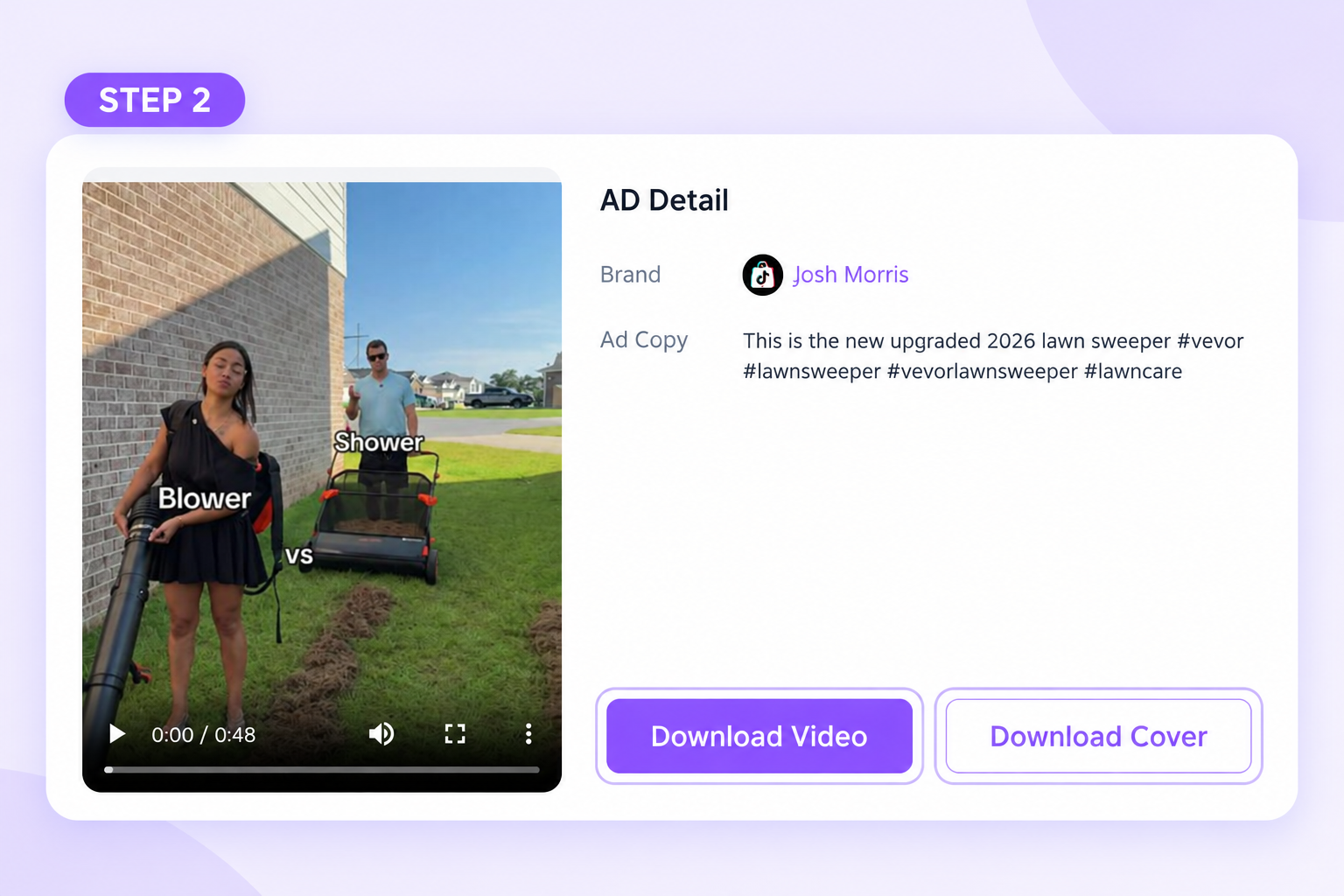
The video and its cover are separate assets. Keep the video for playback and the cover as a visual reference; record the source beside them.
For Facebook ads you want to revisit in your MyAdLibrary account, use the Chrome extension linked from the product's Install Free Extension entry point or the empty Swipe File page. Save the chosen ads through that extension workflow, then open Swipe File in the intended account. A populated card is the confirmation that the reference is available there.
A browser download by itself does not establish that an account entry was created. Likewise, the Facebook collection shown above does not demonstrate TikTok saving inside that account view. You can keep TikTok downloads and their notes in an accompanying reference index.
4. Add a short research record
Start with these five pieces of information. Copy source facts from the ad or detail panel; write the analysis yourself.
| Starter field | Example of a useful entry |
|---|---|
| Identity | Advertiser plus Ad ID or individual video URL. |
| Source and date | Where you found it and when you captured the reference. |
| Creative context | Platform, format, CTA, and destination when available. |
| Observation | “The written opening names beginners and gives a time frame.” |
| Why saved | “Useful for investigating how to make a course feel approachable.” |
Keep this note in your working document or sheet alongside the source. These are recommended research fields, not instructions to find a built-in notes editor or tagging control in the pictured interface.
5. Retrieve one example for a brief
Close the reference and try finding it again using the question that led you to save it. Can you identify the brand, open the right creative, and explain the observation without rebuilding the research?
If that is difficult, improve the record before adding more ads. Our swipe file organization guide adds a consistent naming system and research fields to use when the collection grows.
A worked example: from a saved ad to an original idea
Take the course-ad detail shown above. The visible copy identifies a beginner audience and presents a time-bounded outcome. You can use that information without claiming that you watched every second of the video or know the campaign's results.
Separate three parts in your note:
- Observation: The written message addresses beginners and introduces a specific time frame.
- Hypothesis: A clearly bounded first step may reduce uncertainty for someone considering a course.
- Original execution: Show what a new learner can actually do in the first lesson, using your own product and evidence.
The hypothesis is a proposal to test. Do not copy the advertiser's time promise into your own campaign unless you can support it. A brief could ask the creator to show the starting task, the outcome of that task, and the next action, with a source link included only as a reference for the pattern.
That is the practical return from a swipe file: a specific decision for your own creative team. The saved reference helps explain the idea; your campaign supplies its own offer, proof, visuals, and voice.
What to save, skip, and revisit
Save an example when you can explain the choice worth studying. A weak execution can also be useful if you describe the problem it illustrates, such as a confusing transition or an offer that is difficult to read.
Skip exact duplicates and examples you cannot attribute. Keep meaningful variants when they change the hook, demonstration, offer, or CTA. Record those differences so several files from one advertiser do not look like interchangeable copies.
Revisit the collection when you receive a new brief. Check whether the original source is still available and whether your old observation remains relevant. If a link disappears, retain the capture date and note the change rather than pretending the reference is current.
FAQ
Is a swipe file the same as an ad library?
An ad library is a source you browse. A swipe file is the selected set you keep for your own research, with the context and observations that make it retrievable.
Can I start for free?
Yes. Start with public examples, MyAdLibrary's free downloaders, and a small research sheet. Log in when you want to browse the saved ads in your MyAdLibrary account.
Should I save every ad from a competitor?
Start with the examples that answer your question. Save additional variants when you can name the difference they introduce. A larger collection helps only when you can find and interpret the entries.
Can I reuse a saved creative in my own advertising?
Use it as a reference unless you have permission to reuse the creative. Extract the underlying approach and produce an original execution with your own material and supported claims.
Start with one example you can explain
Open MyAdLibrary and choose one relevant public ad. Save its media through a free downloader or revisit a saved card in Swipe File, then record what you learned. Repeat that small process until the next brief has a useful set of references behind it.