

TL;DR
To find inactive Facebook ads, search the advertiser or keyword in Meta Ad Library, open Filters, and select Inactive ads under Active status. Results depend on what Meta still makes available. The filter does not recover every commercial ad that has stopped running.
As checked on November 6, 2026, Meta describes one-year archiving after the last impression for ads delivered in the EU or UK, and a seven-year history for ads about social issues, elections or politics. These are different scopes. Save useful media and source context while available with the Facebook Ad Library Downloader, without assuming a complete historical archive.
What “inactive” tells you—and what it leaves unanswered
An inactive record indicates that the ad is not currently shown as active in the library. It does not explain the advertiser's decision. A seasonal promotion may have ended, a creative may have been replaced, or a campaign may have changed for reasons you cannot see.
Keep status separate from availability. An inactive ad can remain visible because it falls within an archive category. Another stopped ad may no longer be available to you. A missing result is not the same thing as an inactive record with a documented date range.
Also separate the ad record from its assets. You may be able to read a record while some media or versions are unavailable. Finding a historical entry does not guarantee that every image, video or destination can still be opened or downloaded.
Which old Facebook ads can you search?
Meta's Ad Library homepage and FAQ describe the following coverage. The table summarizes the published scope checked on November 6, 2026; it is not a promise that every record or media file will be accessible in every search.
| Ad scope | Historical coverage described by Meta | Research implication |
|---|---|---|
| Ads currently running across Meta technologies | Current active ads | Use this for present creative research; do not assume an archive of all stopped commercial ads |
| Ads delivered anywhere in the EU or UK | Archived for one year after the last impression | Some inactive commercial ads remain available within the applicable window |
| Ads about social issues, elections or politics | Ads from the past seven years | The longer archive belongs to this category, not to every ecommerce or brand ad |
The country selected in your search is not, by itself, the entire explanation for a record's retention. In our live session, inactive keyword results with United States selected included entries carrying EU transparency labels. Inspect the record and its transparency information rather than assuming that a country dropdown guarantees or excludes a particular historical record.
For UK history, Meta's homepage also mentions the rollout beginning July 1, 2025. Check the current source when researching dates near that boundary. Do not apply today's archive description backward to periods before the coverage existed.
Step 1: recover the best source you already have
If you saved the original individual-ad link, start there. A Meta library URL containing id= is more precise than searching a remembered phrase from the copy. Record the Library ID even if the ad is currently unavailable.
If you know only the brand, search its name and select the advertiser entry that matches the intended Page. If you remember only the message, a keyword search can help discover candidates, but verify the advertiser on each result. Retailers, partners and unrelated businesses can use similar wording.
Choose the relevant country and category. Begin with broad media and language settings so that an unnecessary restriction does not hide the record you need. Add date or format constraints after you have confirmed that the advertiser and source are correct.
Step 2: change active status and inspect the returned records
Open Filters, expand Active status, choose Inactive ads, and apply the filter. Use Active and inactive when you want to compare the currently available mix instead of reviewing only stopped ads.
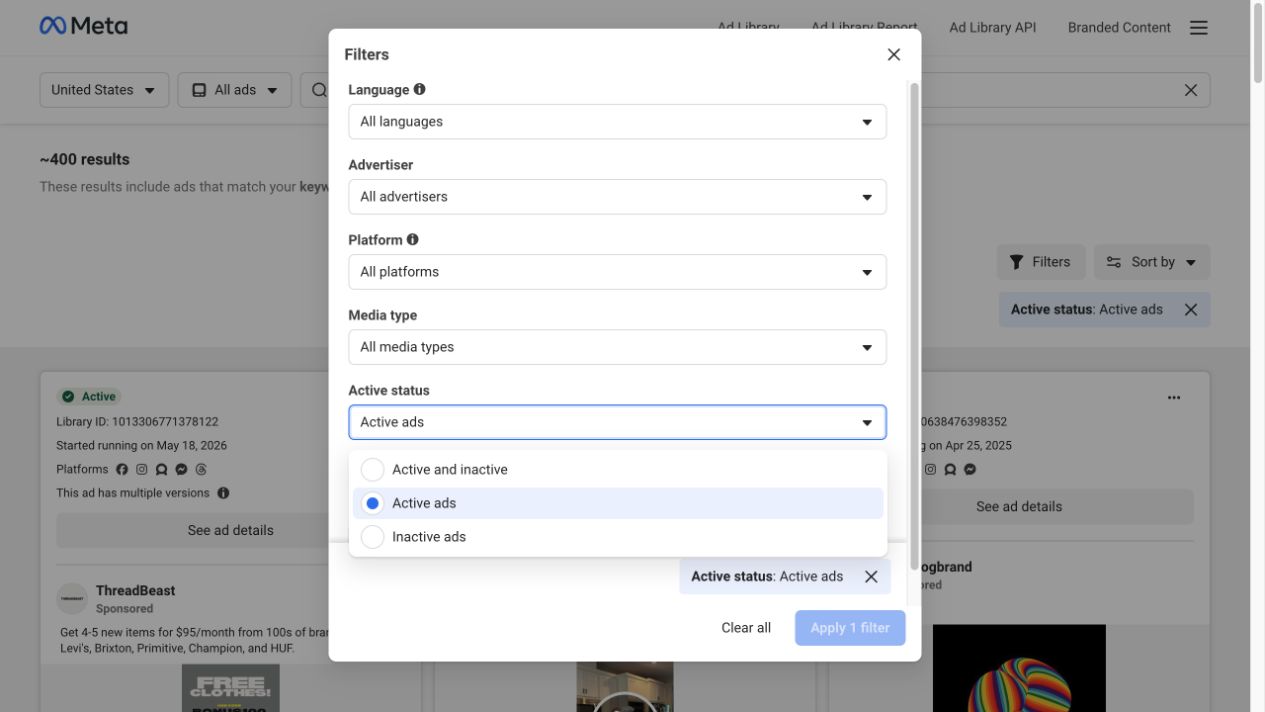
Live capture, November 6, 2026. The Active status menu changes the records included in the view. Its presence does not establish universal historical coverage.
Confirm the selected status chip on the results page. Then inspect individual cards for their status, advertiser, Library ID, displayed date range and transparency labels.
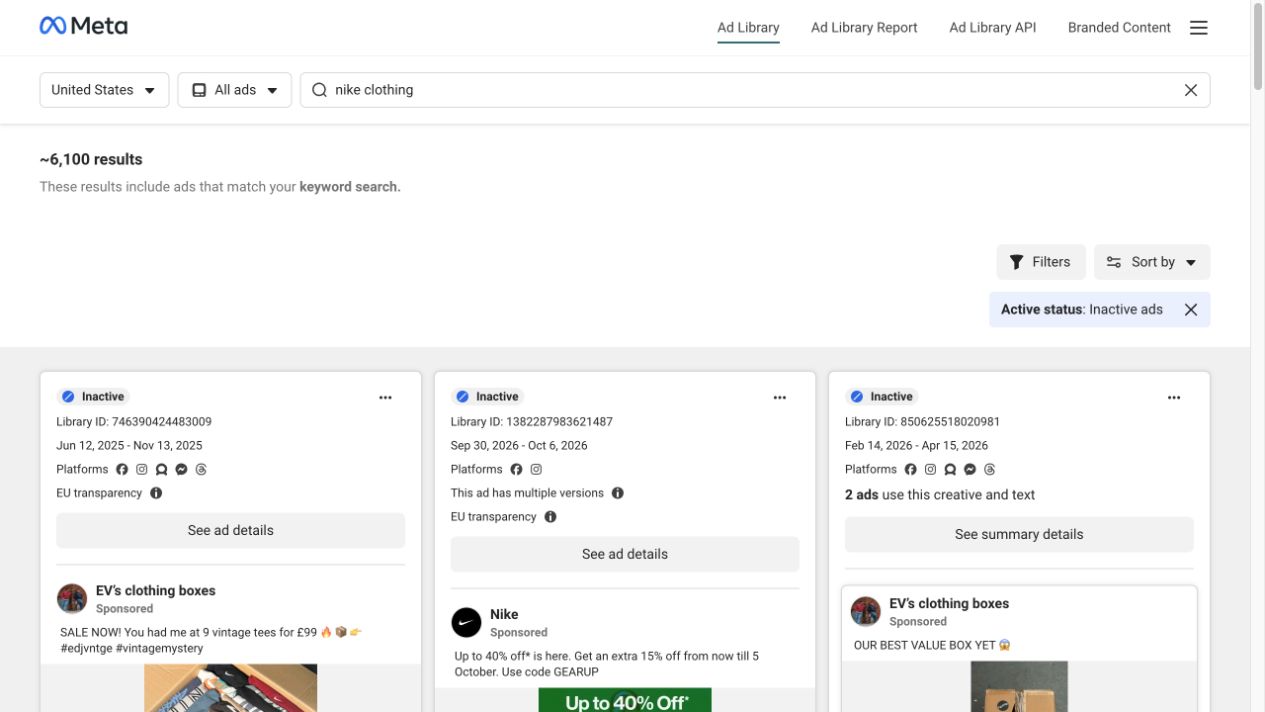
Live capture, November 6, 2026. The “nike clothing” keyword view returned inactive records from multiple advertisers. The approximately 6,100 results shown belong to that filtered keyword search, not to Nike alone.
This observation is useful because it demonstrates actual inactive results. It does not show a complete advertiser archive, nor does it establish that every stopped ad is retrievable.
Step 3: open the old ad and record what survives
Select See ad details for the record you want. Check the displayed dates and review available versions. In our session, the Nike record with Library ID 1382287983621487 was marked inactive and displayed September 30–October 6, 2026. Its details also indicated multiple versions.
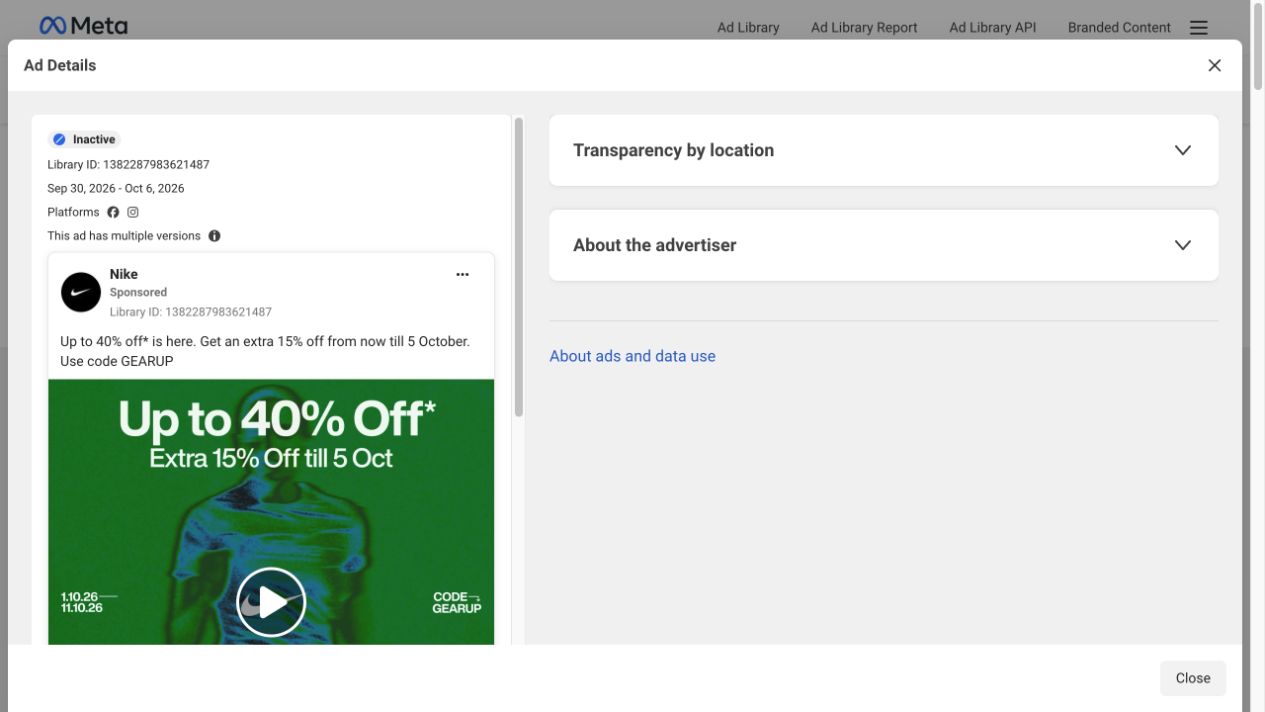
Live capture, November 6, 2026. This specific record remained visible when checked. The screenshot establishes the displayed status and dates, not the ad's performance or the future availability of its media.
Use a small evidence record for each reference: advertiser/Page, Library ID, source link, capture date, displayed start and end dates, status and available media. Keep any interpretation in a separate note.
For example, “The record displays an end date after the advertised sale period” is a bounded observation. “The campaign was stopped because the offer failed” requires business evidence that the library does not provide.
What to do when an old ad is missing
Reopen the original link, confirm the advertiser, broaden unnecessary filters and check the applicable archive window. If you still cannot locate it, preserve the result as an unresolved availability check. An empty search cannot reveal whether the cause is coverage, removal, an incorrect source or a temporary issue.
Look through references you already saved: media files, screenshots, briefs and source notes. These may preserve the creative you need, but distinguish an earlier capture from the current live record. A screenshot taken last month cannot confirm today's status.
If the whole library is failing to load, treat that as a separate access problem before interpreting the missing ad. Conversely, a working search with other results is not proof that the one missing record should still be available.
Avoid services or workflows that promise to recover any deleted Facebook ad without explaining where the data came from and when it was captured. A downloader's ability to retrieve current source media is different from maintaining a previously collected archive.
Preserve useful references before availability changes
When an ad remains accessible, copy its individual library URL into the Facebook Ad Library Downloader, select Find media, and review what is available. Save the media you need together with its source and capture date. A retrieval request may return only some fields or assets; do not label it complete history.
MyAdLibrary provides a free download entry without signup, subject to availability and usage allowances. Account-based Swipe File saving requires sign-in. Neither workflow should be described as guaranteed recovery of an ad that has disappeared from its source.
Our guide to keeping Facebook ad copy and source details explains what to retain beside the media. For a useful review structure, follow the Facebook and TikTok ad swipe-file organization guide.
A reference collection in MyAdLibrary is most useful when each example answers a creative question: how an offer changed, how a product was demonstrated, or how a campaign's message developed. Keep those questions attached to the evidence rather than treating age or inactive status as a quality score.
FAQ
Can I see inactive ads in Facebook Ad Library?
Yes, some inactive ads remain searchable. Use the Active status filter and check the applicable region or ad-category archive coverage. The filter does not guarantee access to every stopped commercial ad.
Does Facebook Ad Library keep every ad for seven years?
No. Meta describes the seven-year archive for social-issue, election and political ads. Do not apply it to all commercial advertising.
Does inactive mean the ad performed badly?
No. The status does not reveal the advertiser's reason for stopping delivery or the ad's results. Use performance data from the advertiser's own reporting to answer that question.
Can I download an inactive ad?
Possibly, if supported media remains available from the source. Check the specific record and retrieval result. Historical visibility alone does not guarantee a successful download or access to every version.