
TL;DR
- To download Instagram ads, copy one accessible Instagram content link or an individual Meta Ad Library ad link, paste it into MyAdLibrary's Instagram Ad Downloader, and select Download.
- When a result contains a video, Download Video saves the moving creative; Download Cover saves its still image. Carousel results have separate slide and ZIP controls.
- Use Meta Ad Library to confirm Instagram ad placement. An accessible Instagram post or a successful download alone does not prove it was advertised.
- Open the saved file and keep its source URL, advertiser, capture date and one research note.
- The browser offers a free starting workflow. Availability and usage limits can affect retrieval; an account collection in Swipe File is a separate, login-based workflow.
The shortest way to download an Instagram ad is to start with the specific creative, retrieve its available media, and save the asset you actually need. A video helps you study delivery and pacing. A carousel requires its card sequence. A cover image helps you recognize a reference but cannot replace either.
This guide explains how to download Instagram ads with the current browser workflow in MyAdLibrary, including the link choices and result controls that are easy to confuse.
Choose the source link before opening the downloader
You can start from an Instagram content page or an individual ad record in the official Meta Ad Library. These sources give you different kinds of context.
| What you have | What to copy | What it establishes |
|---|---|---|
| An accessible Instagram post or Reel | That individual content's share link | The location of the creative; it may be organic or used in an ad |
| An ad in Meta Ad Library | The individual ad link containing its id value | An identifiable ad record; check its listed platforms for Instagram |
| An advertiser's profile | Open the specific post or ad first | The profile identifies an account, not one downloadable creative |
| A product page reached through an ad | Return to the ad and copy its creative or record link | The product page is a destination, not the ad media |
The Instagram downloader accepts individual Instagram content links and Meta Ad Library detail links. A Meta link looks like facebook.com/ads/library/?id=AD_ID. Keep the complete address rather than extracting only the number. For Instagram, copy the post or Reel link rather than the account homepage.
If you have not found a paid reference yet, follow the Instagram ad library guide. It explains how to search an advertiser and check Instagram placement before collecting files. You do not need to assume that every post in a brand's feed has advertising behind it.
Step 1: paste one complete link
Open the Instagram Ad Downloader. Paste your chosen address into Paste an Instagram link, then select Download. The same field supports the individual Meta ad links described above.
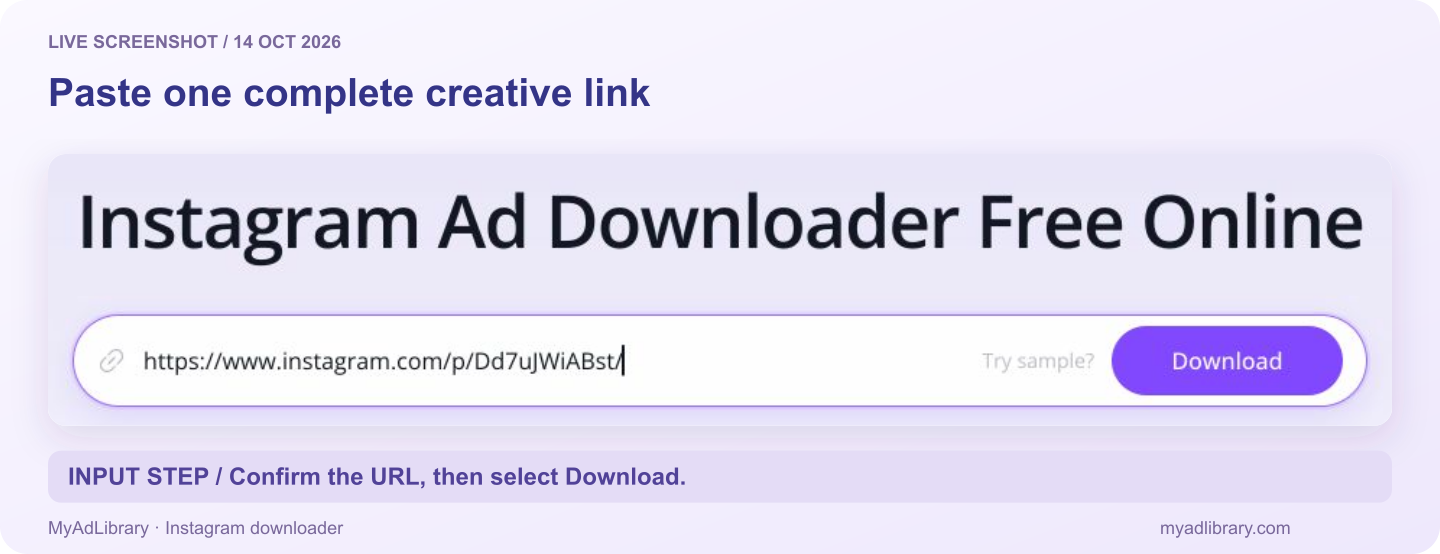
Live input captured October 14, 2026. The address is one individual Instagram content URL; the screenshot shows the step before retrieval.
The first Download button asks the tool to analyze the link and retrieve available media. Wait for that request to finish before selecting a media action. A pasted URL or an analyzing indicator is an intermediate state, not a completed file download.
The Try sample? button fills an example address so you can explore the interface. Replace it with your chosen ad when you begin research. An example from the product is not evidence that the advertiser you intended to study has been selected.
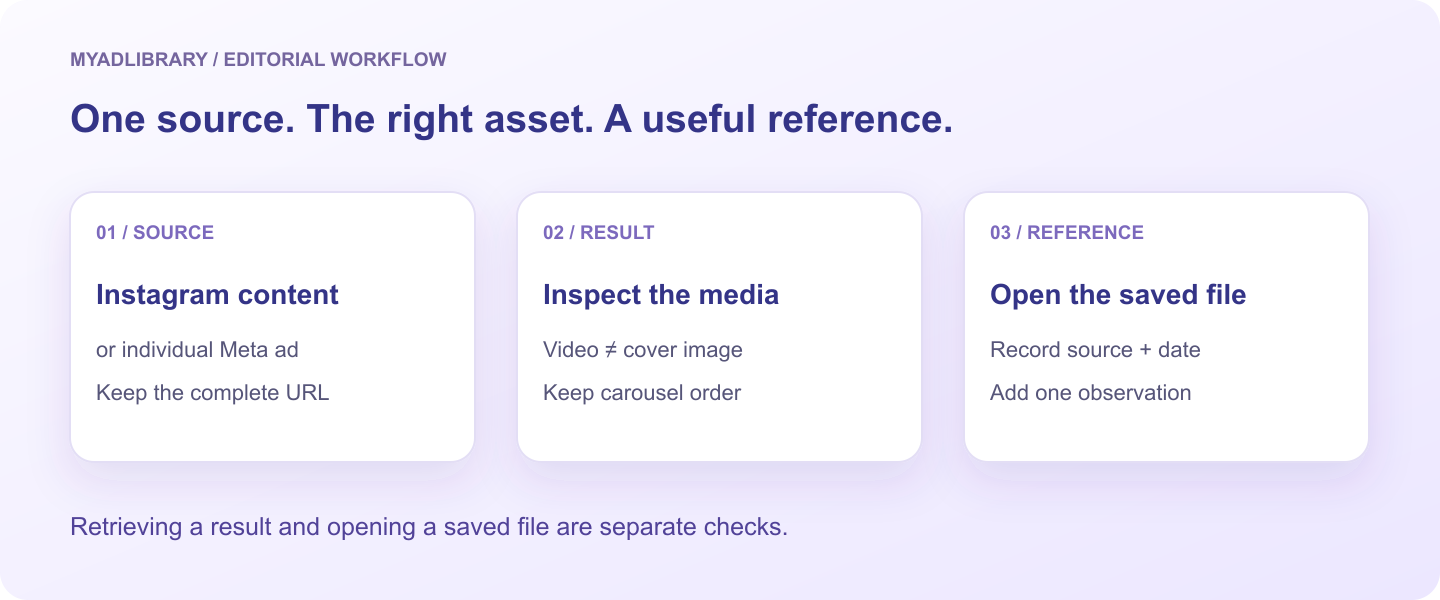
The diagram describes the workflow; it is not a screenshot of a completed download.
Step 2: check the result before saving
Inspect the preview and any returned AD Detail fields. Compare the brand, image or opening frames with the original source. If the result contains copy, read enough to distinguish it from similar ads from the same advertiser.
In an interface observation on October 13, 2026, one built-in Instagram sample returned a video result with Brand, Ad Copy, Download Video and Download Cover. That observation establishes the displayed controls for that sample. It does not establish a paid campaign, a particular resolution, or a completed save to disk.
Use the media controls that appear for your result:
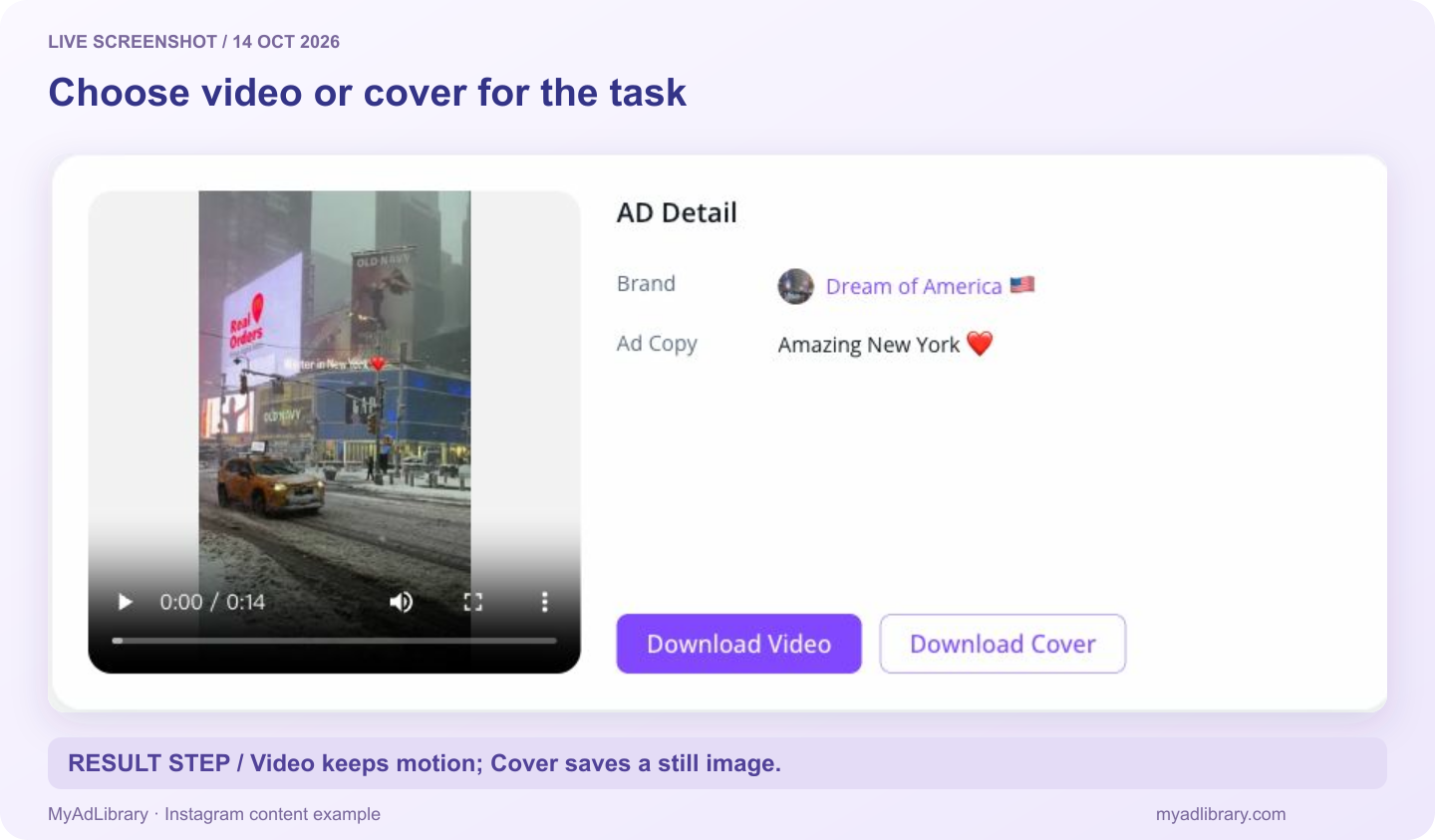
The same Instagram URL returned this result on October 14. It demonstrates the media controls; paid placement has not been established for this public content example.
| Returned creative | Useful check | Save action |
|---|---|---|
| Video | Play it and match the opening to your source | Download Video |
| Video cover | Confirm the still represents the video you selected | Download Cover |
| Single image | Read the offer and inspect the image | Download Image |
| Carousel | Move through the cards and check their order | Download slide N or Download all as zip |
The right download is the asset that answers your research question. Choose the full video to study how a demonstration unfolds. Choose a cover to label your reference folder. Choose the carousel sequence to study how one card sets up the next.
Step 3: download the video and open it
For a video result, select Download Video. Check the browser's downloads list for completion, then open the saved file in your normal player. Watch the section you need to analyze and check that sound is present if spoken delivery matters to your question.
If you also save the cover, give it a related filename so you can reconnect it with the video. A cover may be useful in a brief's reference index; it should not be labeled as the full creative.
Check the downloaded asset itself before describing its quality. Read the captions at the size you will use in your brief and inspect the sequence you wanted to retain. An available source may differ from the advertiser's original production file. Downloading cannot restore detail absent from the supplied media.
On mobile, look in the browser's downloads view or the device's file app. A browser save does not necessarily add the video to the camera roll. Find and open the file before starting another download.
Step 4: keep a carousel's sequence intact
In the same October 13 interface observation, an individual Meta ad link opened in the Instagram downloader returned a carousel for Picked and Paid, a 1 / 10 counter, Download slide 1 and Download all as zip. Its CTA and landing page were also displayed. This confirms the available result controls for that source, while the saved files and its exact paid placement still require their own checks.
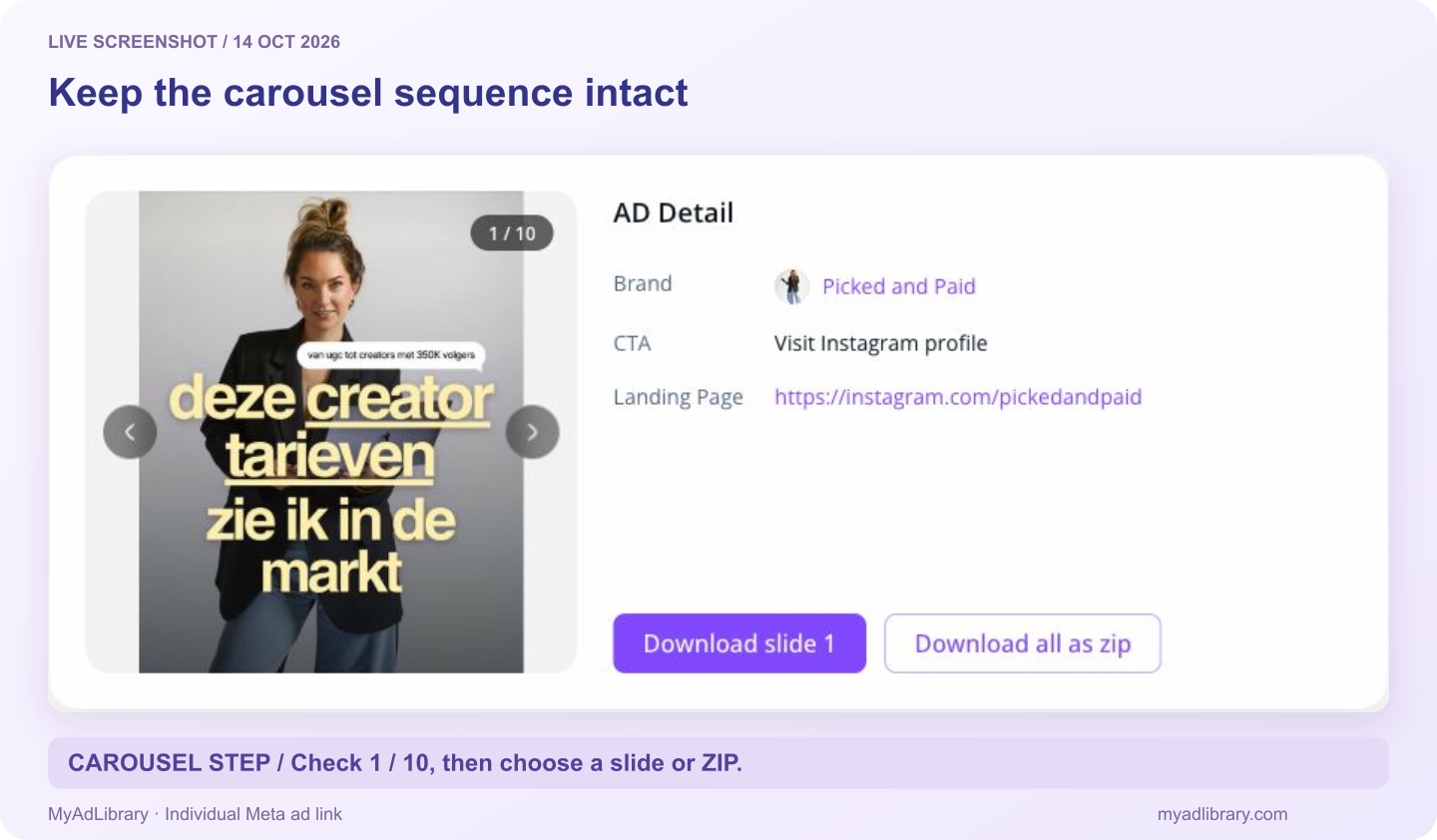
Captured again on October 14 from Meta Ad Library record 920561980774167. The card counter identifies the selected item. A CTA pointing to Instagram is not by itself proof of Instagram placement.
For a carousel result, inspect the card counter and use the arrows to move through the returned assets. Download slide N saves the current item. Download all as zip requests the available set together.
If your question is about a particular price or benefit card, save that card with its position in the sequence. If your question is about the whole argument, retain the sequence. The first card's promise and the last card's action can be more informative together than either is alone.
After opening a ZIP, check which files were returned. Preserve their order if you rename them, using numbers such as 01, 02 and 03. Do not assume the archive also contains the ad copy, platform evidence or your research notes. Record that context separately.
The carousel ZIP groups media from a returned creative. It does not establish that you downloaded every ad from the advertiser. Start with a few selected references that each answer a defined question.
Keep the evidence beside the media
A file is useful when you can explain where it came from and why you kept it. Create a small accompanying note in your research document:
| Field | What to record |
|---|---|
| Source | Individual Instagram URL and/or Meta ad record URL |
| Identity | Advertiser name and Ad ID when available |
| Capture | Date collected and the market used in the ad-library search |
| Placement | Instagram shown in the source record, or “not confirmed” |
| Observation | A visible creative choice, such as the product appearing before the voiceover |
| Test idea | A change you could test with your own footage and supported claims |
For example, “The first card shows the assembled product; the next explains how it fits into a small room” is an observable note. “This carousel has a high conversion rate” requires evidence you do not receive from the file alone.
If you use Swipe File, log in to inspect the references saved to your account. A local download does not confirm that a record was also saved there. For a consistent external research index, use the field suggestions in our swipe file organization guide.
Troubleshoot the stage that failed
| Problem | What to do next |
|---|---|
| The URL is rejected | Copy one individual Instagram content URL or Meta ad detail URL; remove surrounding text and avoid profile/search links |
| The result is for the wrong creative | Compare the source ID and preview; check whether a sample address remains in the input |
| You expected a video but see image controls | Inspect the source's format and choose a video creative if motion is required |
| Only a still image was saved | Check whether you selected Download Cover or an image slide |
| A result loads but a file does not appear | Inspect the browser's downloads list for a failed request or save prompt |
| A carousel item is missing | Compare the extracted set with the result and try the individual slide control |
| The source is inaccessible | Reopen it at the source; keep the link and availability note if media cannot be retrieved |
| A limit or login message appears | Follow the displayed account/usage guidance; repeated pasting is not a dependable way to change a limit |
Avoid treating one failed request as proof of a particular cause. A link can identify content correctly while the source media is unavailable. Keep a useful record even when you cannot save the asset.
FAQ
Is there a free way to download Instagram ads?
MyAdLibrary offers a free browser starting workflow for supported links. Paste one individual source URL and inspect the returned media. Usage limits and source availability still apply; free access does not guarantee every ad can be retrieved.
Can I paste a Meta Ad Library link into the Instagram downloader?
Yes, the current workflow supports individual Meta ad detail links as well as Instagram content links. Use the ad's specific URL containing its ID, and confirm Instagram placement in the source record. A general Meta search URL is a different kind of link.
Can I download Instagram carousel ads?
When a source returns multiple carousel assets, the result offers a selected-slide action and a ZIP action. Inspect the returned sequence and open the saved files; do not assume every source returns the same assets.
Does downloading an Instagram post prove it is an ad?
No. An Instagram post can be organic. Use the Meta ad record or a clearly identified paid placement for advertising evidence, and keep that evidence with your reference.
Can I reuse a competitor's downloaded creative?
A download does not transfer rights to the footage, design, music or copy. Retain third-party work as a reference where permitted, follow the source platform's terms, and obtain the necessary permissions for reuse. Build your own creative around the idea you want to test.
Save one reference you can explain
Use the Instagram Ad Downloader with one identified creative. Choose the correct media action, open the saved file, and add its source plus a concrete observation. That gives your next brief something more useful than a folder of unnamed videos.