

TL;DR
To find the active ads count on Facebook Ad Library, select the intended advertiser in Meta Ad Library, choose your country and All ads, set Active ads, and read the results count above the cards. Record the exact displayed value, including an approximation marker such as ~, together with the date and filters.
That number describes the selected library view. It is not automatically the advertiser's worldwide total, its number of unique creative ideas, or its budget. Use the Facebook Ad Library Downloader to inspect available creative references after establishing the source scope; the number of downloaded files is a separate measure.
Step 1: select the advertiser before reading any count
Type the company name into the library's search field and choose the matching entry under Advertisers. Check the Page identity and handle. Large brands may have separate regional, product-line or partner Pages.
Do not use a keyword total as the brand's count. A search phrase can match many advertisers' copy, including retailers selling the brand's products. Selecting a specific Page creates a different view.
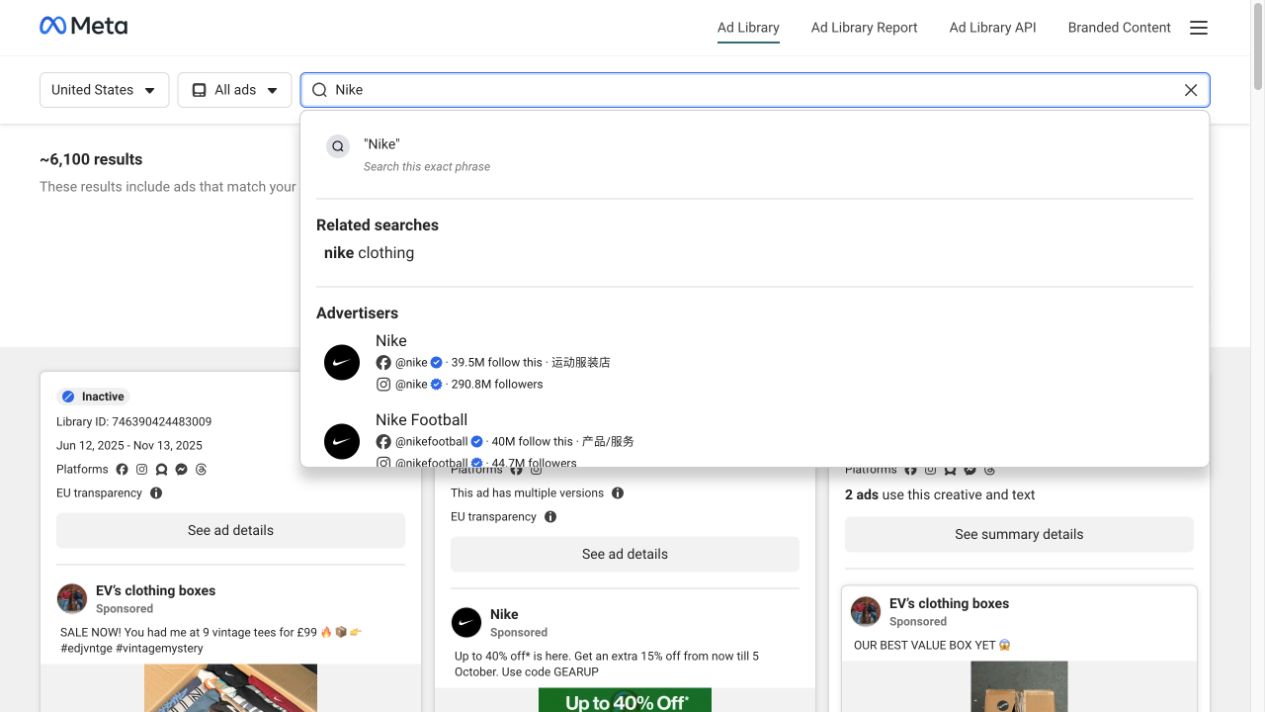
Live capture, November 6, 2026. Nike and Nike Football are separate visible advertiser suggestions. The advertiser you choose determines which Page the subsequent count describes.
If your research concerns the whole company, list the Pages you included. Do not silently combine one region's official Page with unrelated resellers. A company-level total requires an explicit method for handling multiple Pages and potential overlap; a single Page observation is usually easier to reproduce.
Step 2: define what “active ads” means for this snapshot
Choose the country relevant to your comparison and All ads for ordinary commercial research. Open Filters and select Active ads. Inspect the other controls before reading the number.
For a broad Page snapshot, avoid unnecessary keyword, media-type, language or impression-date restrictions. If your question is narrower—such as active video ads—keep that filter and include it in the result's label.
The library includes ads across Meta technologies. Keep all platforms for a Meta-wide Page view, or select Facebook if the question specifically concerns that platform. Those two counts should not be compared as if they share the same scope.
Once results load, read the count above the cards and confirm the active-status chip. Capture the state rather than copying a number without its conditions.
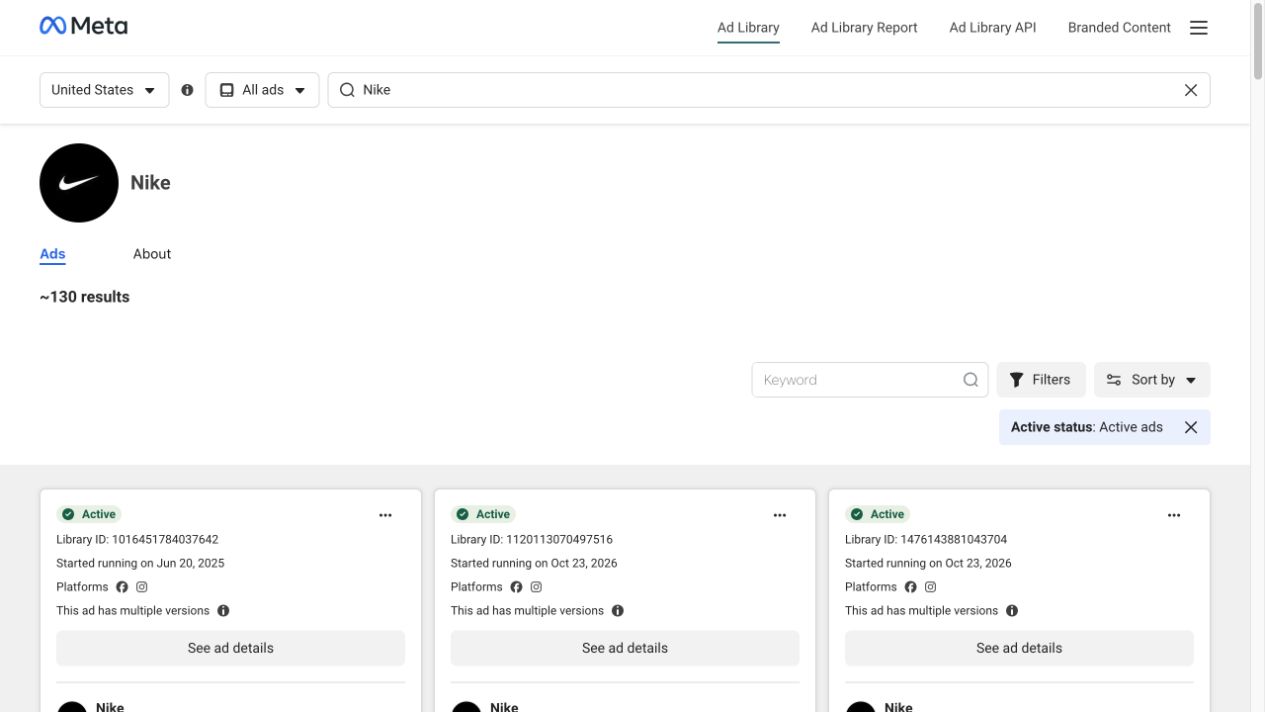
Live capture, November 6, 2026. The Nike Page view showed “~130 results” with United States and Active ads selected. The platform scope was all platforms. This is a dated observation of that view, not a claim about Nike's current worldwide ad count.
Step 3: preserve approximation and collection limits
If Meta displays ~130 results, report “approximately 130 results,” not “exactly 130 active ads.” Preserve the approximation instead of converting it into false precision.
A screen showing several cards is also not the full result set. More results may load as you continue through the page. Counting only what initially fits in the viewport gives you a visible-card sample, not necessarily the displayed total.
When the interface does not provide a usable total, record what you actually reviewed: for example, “24 distinct Library IDs manually inspected in this filtered view.” Do not present that sample as the full advertiser count. If loading stops or some records are unavailable, keep the observation incomplete.
For repeatable research, use this note structure:
| Field | What to save |
|---|---|
| Advertiser | Page name, Page identifier or advertiser URL |
| Capture | Date and time of observation |
| Geography | Selected country or region |
| Category and status | All ads; Active ads, or the actual alternatives selected |
| Additional filters | Platform, media type, language, keyword and dates |
| Displayed count | Exact text, preserving ~ or other qualifiers |
| Evidence | Screenshot and source URL |
| Review scope | Total displayed, records inspected, and any incomplete loading |
A number with this context can support comparison. A number pasted into a slide without the filters is difficult to interpret later.
Ad records, creative versions and files are different counts
The library can show a record with multiple versions. It can also group ads that use the same creative and text. In our research session, a keyword result included labels identifying groups of two, three and five ads using the same creative and text. The visible card count therefore does not always equal the number of underlying ad records.
Open the available detail or summary view before reconciling a manual count. Preserve individual Library IDs when visible, and avoid adding a grouped summary to its constituent records again. If the interface does not expose enough information to resolve a group, document that limitation rather than guessing.
Creative ideas are a further distinction. Two different ad records may reuse the same hook and footage. Conversely, one record may present several versions. Neither automatically tells you how many genuinely different concepts the team tested.
Downloaded assets introduce another counting unit. One carousel can contain multiple image files; a record can return a video and related assets. The file total in a folder should not replace the library's ad count.
| Measure | Useful for | Do not treat it as |
|---|---|---|
| Displayed library result count | A dated overview of the selected view | An exact global company total |
| Distinct Library IDs inspected | A documented record-level sample | Complete coverage unless actually established |
| Creative concepts identified | Planning which angles to study or test | A direct count supplied by Meta |
| Media files retrieved | Managing the assets you collected | The number of active ads |
Compare snapshots only when their scope matches
Repeat the observation using the same advertiser, market, status and additional filters. If any condition changes, annotate the change before interpreting the difference.
Consider an illustrative example: the same Page shows approximately 80 results on one date and approximately 110 on another. That supports a statement that the displayed filtered total increased. It does not establish 30 net-new creative concepts, because records may have started, stopped, changed grouping or reused existing assets between checks.
To understand the creative change, compare the recorded IDs and review representative new or changed references. Note repeated hooks, product categories and offers separately from the total.
Do not add country totals to create a worldwide figure without resolving overlap. The same ad may appear in more than one country view. Likewise, platform-specific views may overlap when an ad runs across Meta placements.
What an active-ad count cannot tell you
A larger visible count can prompt useful questions about creative variety, localization or testing activity. It does not answer those questions by itself.
Do not multiply the count by an assumed daily budget. Ads can have different delivery, allocation and campaign structures, and the public count does not provide the missing inputs. It also cannot establish purchases, profitability or ROAS.
An active label should not be interpreted as proof that an ad received an impression at the exact moment of your check. Treat the library as a public research source with its own update timing, rather than as the advertiser's real-time Ads Manager.
Use counts to decide where to investigate, then use the actual creative and available source information to frame a testable hypothesis.
Save a representative sample for creative review
After recording the count, choose references that answer a specific question: variations of one offer, different opening hooks, or several formats for the same product. Keep their Library IDs and source links alongside the snapshot note.
Paste an individual ad link—or the appropriate advertiser library URL—into the Facebook Ad Library Downloader to review available media. Downloading has a free entry without signup, subject to availability and usage allowances. Account-based Swipe File saving is separate and requires sign-in.
An advertiser request's returned collection is not proof that every record from the library total was retrieved. Our bulk Facebook ad download guide explains how to inspect the returned set. The ad swipe-file organization guide helps turn those references into useful research.
Keep the measurement note and creative sample together in your MyAdLibrary workflow. That gives the next reviewer both the observed scale and concrete examples of what you studied.
FAQ
Is the results count an exact number of active ads?
Only report the precision the interface supplies. If it displays an approximation, preserve it. Always attach the advertiser, country, status and other filters to the observation.
Why does the count change after I select Facebook?
You changed the platform scope. An all-platform Meta view and a Facebook-filtered view answer different questions, so their totals can differ.
Can I estimate ad spend from the number of active ads?
The count alone does not establish spend. It lacks the delivery and budget information required for a defensible estimate.
Why did my download return fewer items than the library count?
The request may have a different scope, retrieval limits or unavailable content. Also distinguish returned records from media files. Inspect the response and source conditions instead of treating the counts as interchangeable.