
TL;DR
- To download Instagram carousel ads, find the ad in Meta Ad Library, confirm Instagram placement, and paste its individual ad link into the Instagram Ad Downloader.
- For a public Instagram carousel post, use its
/p/{shortcode}/address. A public post and a paid-ad record are different sources. - Inspect every returned card. A carousel may require several image or video files; a cover image is not a complete video card.
- Compare the saved assets with the source sequence and note missing cards or variants. A returned file count alone cannot prove completeness.
- Downloading all cards from one ad is different from collecting several ads from an advertiser or several posts from a creator profile.
The first card tells you how a carousel opens. It rarely tells you how the whole creative works. Later cards may explain the product, provide evidence, answer an objection or introduce the offer. Saving only the thumbnail can remove the very sequence you wanted to study.
This guide explains how to download Instagram carousel ads as usable references: choose the correct source, collect the available cards and preserve enough context to understand the sequence later. For the broader single-video and Reel workflow, see our Instagram ad download guide.
Choose between a paid ad and a public carousel post
Start with the question you need the reference to answer. If it concerns an advertiser's paid creative, use its library record. If you simply need the media in a creator's public carousel, use the Instagram post address.
In its announcement of the expanded Ad Library, Meta describes including:
“all active ads any Page is running”
That scope concerns advertising records. An ordinary public post is a different source, so keep the matching ad record when paid distribution matters to your research.
| Source pattern | What it identifies | What to retain |
|---|---|---|
https://www.facebook.com/ads/library/?id={ad_id} | One Meta ad record | Ad ID, advertiser, available placement information and media |
https://www.instagram.com/p/{shortcode}/ | One Instagram post, including a carousel | Post URL, creator, caption context and returned cards |
https://www.instagram.com/reel/{shortcode}/ | One Reel | Reel URL and video; this is a separate format |
https://www.instagram.com/{username}/ | A public creator profile | The profile and available public posts returned for collection |
https://www.facebook.com/ads/library/?view_all_page_id={page_id} | An advertiser's Meta ad collection | Advertiser source and the individual records being studied |
These are explanatory patterns, not working examples. Copy the actual address from the source rather than submitting the placeholders.
For an Instagram ad, open Meta Ad Library, find the advertiser and select Instagram in the platform filters. Then inspect the individual record's placement information and creative. Our Instagram ad library guide covers this discovery stage.
The fact that a downloader accepts a Meta ad link does not itself prove that the ad appeared on Instagram. Neither does an Instagram-profile CTA. Keep the source's placement evidence when that distinction matters.
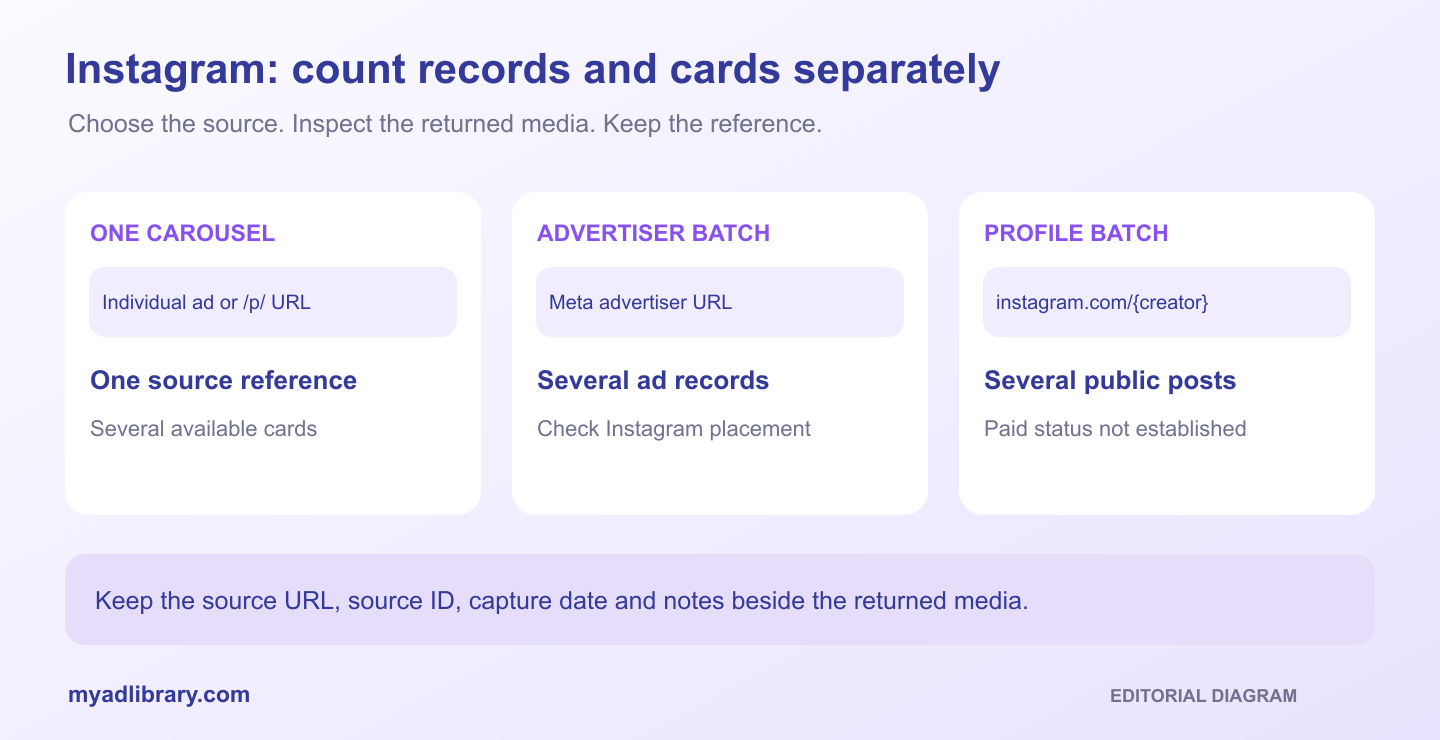
One carousel and an advertiser batch use different units. This is an editorial diagram, not a populated product workspace.
Step 1: inspect the source sequence before retrieval
Open the carousel you actually want to keep. Move through the accessible cards and note the sequence you observed. Check whether the media are images, videos or a mixture, and whether the library exposes several creative versions.
Use the source record to distinguish a sequence from a variant set. Several returned images might be alternative creative versions rather than consecutive cards in one story. The number of assets alone cannot settle that distinction.
Meta Blueprint's multi-media ad workflow course describes:
“uploading multiple images and videos into a single ad”
The course explains that these assets give Meta's delivery system more creative options. A multi-media ad is not automatically an ordered carousel. For this download workflow, check the source format and visible sequence before treating every returned asset as a consecutive card.
Record a few visible landmarks: the opening card, a distinctive middle card and the final message or CTA. This gives you a practical way to match the export without relying only on a filename or the first preview.
If you can inspect only part of the source, record that limitation. Do not label a collection “complete carousel” because you assume hidden cards are identical to the returned ones.
Step 2: retrieve the carousel in MyAdLibrary
Open Instagram Ad Downloader, paste the individual ad or public post URL, and select Find media. The page provides free browser entry without signup for downloading. Source availability and usage limits can still apply.
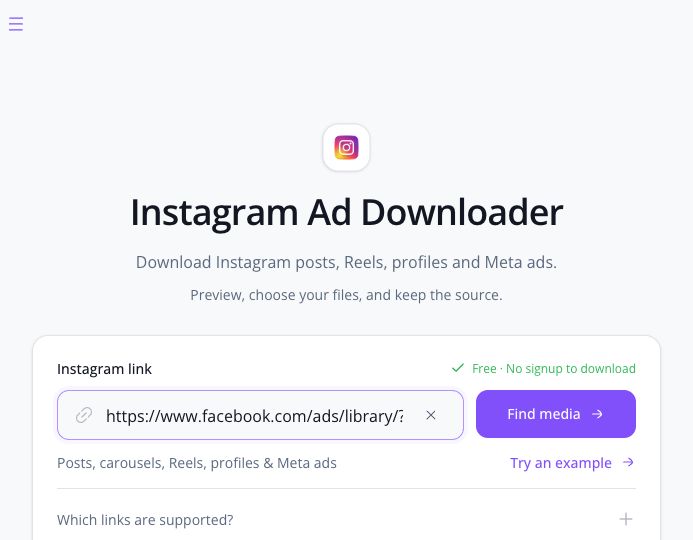
Development input capture, October 29, 2026: a manually submitted Meta ad URL on the Instagram route. A source accepted here is not, by itself, proof that the ad ran on Instagram.
When the result appears, match its media to the source landmarks you recorded. If the returned record provides advertiser information or an ad ID, compare those as well. A shared brand name is not enough when the advertiser runs several similar product ads.
Move through the returned creatives before deciding which ones to save. An image is a media asset; a cover shown beside a video is a preview asset. Check that you are selecting the video itself when you need the moving card.
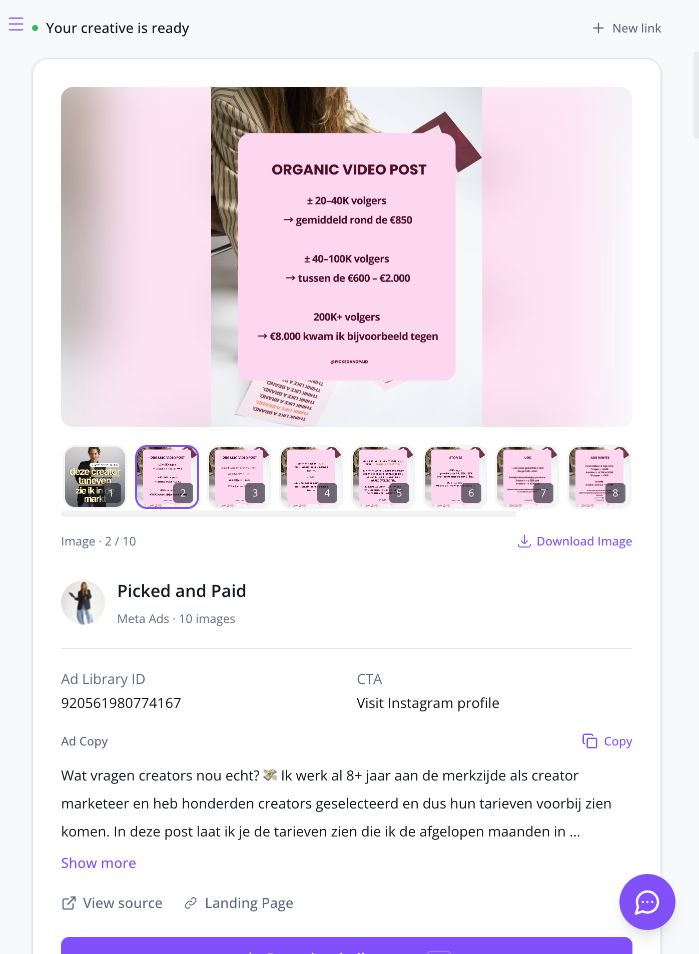
The manual request returned ten images for Picked and Paid, ad ID 920561980774167. This capture shows card 2/10 and the actual source fields. The Visit Instagram profile CTA does not independently establish Instagram placement. No file download was completed for this walkthrough.
If nothing useful is returned, reopen the original link. Confirm that the post or ad is still available and that you copied the creative's source rather than the product page opened by its CTA. Private, removed or unavailable content should not be treated as retrievable simply because you have an old URL.
Step 3: download the cards you need
Choose between two practical tasks:
- A sequence review: keep the available cards needed to understand the carousel from opening through offer.
- A single visual reference: save the particular card you need, and record that it is an excerpt.
Use the result's available individual or group download controls. Where Choose files is available, inspect the selected assets before confirming Download selected. Where offered, Include ad copy & source details can keep returned context with the media. Missing fields should remain missing rather than being reconstructed as captured facts.
A ZIP is a container for the selected files. It does not by itself mean every source card was retrieved, that the files are in a particular narrative order, or that several ads were collected. Inspect its contents before relying on it.
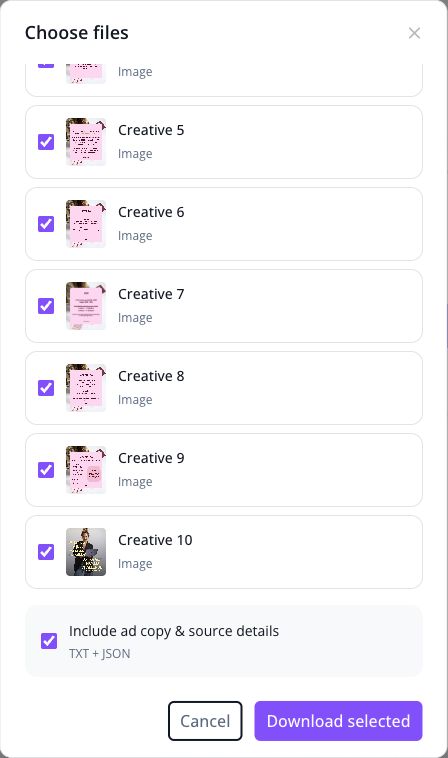
The real selector is scrolled to the later cards and optional TXT/JSON context. Keep the selected media tied to this single source record and check the resulting files after you initiate a download.
If a partial-download message appears, keep track of which assets failed. Retry the missing items where possible and update the status of the reference. An incomplete export can still be useful if it is accurately labeled.
Step 4: preserve the sequence in your working files
After saving, compare each file with the source. Open images at a readable size and play video cards. Confirm that the video includes motion and audio where the source has them; a still cover cannot answer questions about timing.
For public posts, distinguish a video card's audio from music attached to a photo carousel. Meta's announcement of music for photo carousels confirms that photos can have an accompanying song. Note that soundtrack in your source notes rather than assuming the image downloads include it. The walkthrough here does not establish soundtrack export.
Keep the original export, then make a working copy if you want a clearer file order. Add sequence numbers based on the source view you inspected, not on an assumption about the downloader's sort order.
For example, a fictional working folder might contain:
example-brand_carousel_source-id_capture-date/
  01-opening.jpg
  02-product-demonstration.mp4
  03-proof.jpg
  04-offer.jpg
  research-notes.txt
These filenames illustrate a manual organization method. They do not describe a tested MyAdLibrary archive layout, a guaranteed card count or automatic renaming.
In the notes, keep the source link, ad/post ID, capture date, observed sequence and any missing assets. If you captured several versions of an ad, identify the version alongside the card order. Avoid combining the opening from one version with the ending from another and presenting it as a single observed carousel.
Separate carousel downloads from profile and advertiser batches
MyAdLibrary also supports public Instagram profile collection and Meta advertiser-based ad collection. These broaden the source; they do not change what one carousel represents.
| Your task | Appropriate starting source | Unit to track |
|---|---|---|
| Save the cards of one paid carousel | Individual Meta ad detail | One ad record and its assets |
| Save a public carousel post | Instagram /p/ URL | One post and its assets |
| Collect several public posts from a creator | Public Instagram profile | Several posts, each with its own media |
| Collect several ads from an advertiser | Meta advertiser/Page source | Several ad records, with Instagram placement checked where needed |
For an advertiser collection, record your Instagram filter and review the returned records' source information. Do not assume every browser filter is transferred unchanged to the collection request. Keep only the references that meet your research scope.
A creator-profile batch is useful for studying a public content style. It is not evidence that all the collected posts ran as ads. If paid placement is central to your analysis, connect the creative to a matching library record.
Study the sequence rather than treating every card as a separate idea
A useful carousel note describes what changes from one card to the next. Does the opening ask a question? Does the next card demonstrate the product? Does the final card introduce a discount that changes the meaning of the earlier message?
An illustrative observation might be: “The first card names the problem, while the offer appears only after the demonstration.” A test hypothesis could be: “Try moving our offer earlier while retaining the demonstration.” Keep those two sentences separate so the new proposal is not mistaken for something the source proved.
A carousel download does not reveal conversion performance. Neither the presence of several versions nor a long visible running period proves that a particular sequence is profitable.
You can keep your working references in Swipe File through its signed-in save workflow. Confirm the save separately from the local download. Our swipe file organization guide explains a broader approach to naming, source notes and creative hypotheses.
Troubleshoot missing or confusing cards
| Problem | Next action |
|---|---|
| Only the first image was saved | Inspect the other returned creatives and your selection before exporting again |
| One expected card is absent | Recheck the source/version and record whether the card was unavailable or the download failed |
| A moving card became a still image | Check whether you saved its cover rather than its video |
| Several images look unrelated | Inspect whether the record contains variants rather than one ordered carousel |
| The saved order looks wrong | Compare with the observed source sequence and number a working copy manually |
| A profile collection contains non-ad posts | Use a library record to establish paid placement |
| Some context fields are empty | Retain the source URL and record the missing details without inventing them |
FAQ
How do I download an Instagram carousel without losing the order?
Inspect the source sequence, retrieve the available cards, then compare each saved file with that source. Keep a numbered working copy and note the source version. Do not assume ZIP order establishes the original narrative.
Can I download images and video cards from the same reference?
MyAdLibrary supports image, video and carousel sources. Save the assets actually returned for the reference and check their media types. Support for a format is not a guarantee that every source exposes every card.
Does a public carousel URL prove the post was an Instagram ad?
No. Use a matching Meta Ad Library record and its placement information when you need evidence of paid distribution on Instagram.
Can I republish the downloaded carousel?
A download does not grant permission to republish the images, video, music or copy. Follow platform terms and obtain the rights needed for your intended use.
For U.S. copyright questions, the U.S. Copyright Office's permission and fair-use FAQ explains how to request permission and notes that fair use depends on the circumstances. Public availability alone does not settle whether your intended reuse is permitted.
Keep the whole lesson, not just the opening image
To download Instagram carousel ads as useful references, start with the correct source, inspect every returned asset and compare the saved set with the sequence you saw. Use the Instagram Ad Downloader from MyAdLibrary when you have a specific ad or public post to collect.
Sources and scope
Sources reviewed and citations updated October 30, 2026. The product screenshots were captured October 29, 2026.
- Meta, March 28, 2019: A Better Way to Learn About Ads on Facebook documents the expansion of the Ad Library to active Page ads. It is the source of the first quotation, not evidence that every historical ad remains available.
- Meta Blueprint, undated course overview: Streamline creative setup with the multi-media workflow explains multi-asset ad setup. It is the source of the second quotation; it does not establish the sequence or completeness of a downloaded carousel.
- Meta, August 11, 2023: New Ways to Create With Music and Collaborate With Friends on Instagram supports the distinction between photo cards and an accompanying song in public posts.
- U.S. Copyright Office: Can I Use Someone Else's Work? Can Someone Else Use Mine? provides U.S. guidance on permission and fair use.
These sources support the platform and rights context. The MyAdLibrary controls and returned media described above come from the documented development walkthrough; no completed file download or full-carousel export was verified.