Find names you can actually investigate
Shopify Apps Detector turns visible storefront clues into app matches. Open an available Shopify App Store listing to research the tool’s purpose and current options.

Shopify Apps Detector
Discover the apps behind a Shopify storefront.
Research public app signals. No store access required.
Try a real Shopify store
Research public signals. Keep your store private.
Turn a storefront feature into an app research lead. Find public app matches, check their categories and explore tools that could fit your own store.
The Shopify Apps Detector helps identify apps through the signals a Shopify storefront makes public. MyAdLibrary organizes those matches so you can investigate the tools behind a store’s reviews, marketing, support and other visible features.

A review panel or cart feature looks useful, but its name is unclear. Shopify Apps Detector gives your search a concrete starting point, so you can spend more time judging fit.

Bring the useful details into view, then decide what deserves your attention.
Shopify Apps Detector turns visible storefront clues into app matches. Open an available Shopify App Store listing to research the tool’s purpose and current options.
Check match confidence and available evidence in Shopify Apps Detector. Decide which result deserves a closer look before adding it to your own shortlist.
Use the free Shopify Apps Detector, search for an app name and filter by category. Keep the research centered on the customer need you are trying to solve.
From an interesting storefront to a question you can act on.
Start with one feature rather than an entire technology stack. Enter the store URL in Shopify Apps Detector and compare the public matches with the experience you observed. A named app gives you a useful lead to investigate: what does it do, where does it appear, and could the store’s theme already provide a similar feature? Open available listings and the storefront itself to build context. Use the app list to guide your questions. Public scripts and widgets can reveal clues, but they do not provide a verified inventory of every active app in the merchant’s account.
If shoppers need better product information, focus on review-related tools. If they need help before buying, study the support experience. Shopify Apps Detector lets you search names and narrow results by category, helping you avoid an unfocused list of apps. Use this Shopify app finder to decide which candidates warrant a closer comparison. Check the features, pricing, theme compatibility and setup requirements in each current listing. Record the shortlist in your own notes, and check whether an existing app already covers the task before you propose another installation.

Use Shopify Apps Detector to review the confidence label and the information under Why this match. A high-confidence public signal can support a stronger research lead, while a medium-confidence match deserves extra checking. Keep the source store and the feature you observed beside the app name in your own brief. This gives a developer or client a clearer starting point than an unexplained list of vendors. Detection does not establish the merchant’s subscription, configuration or use of every feature. Traces can also remain after removal, so revisit the live experience before making a recommendation.

An ad promises an outcome; the store needs to explain the offer and make buying straightforward. Use Shopify Apps Detector to investigate tools around that journey, then compare the relevant page with the creative you saved. Keep your ad references in Swipe File and write down the customer problem you want to address. Use Shopify Store Analyzer when the question also involves catalog or traffic context. App discovery can inform your test plan, while your own store analytics and customer feedback will show whether the change helped.

Start with a public URL, inspect the available results and choose a clear next step.
Choose a publicly accessible Shopify store. Paste its domain into Shopify Apps Detector; a product URL can be normalized to the store’s domain.
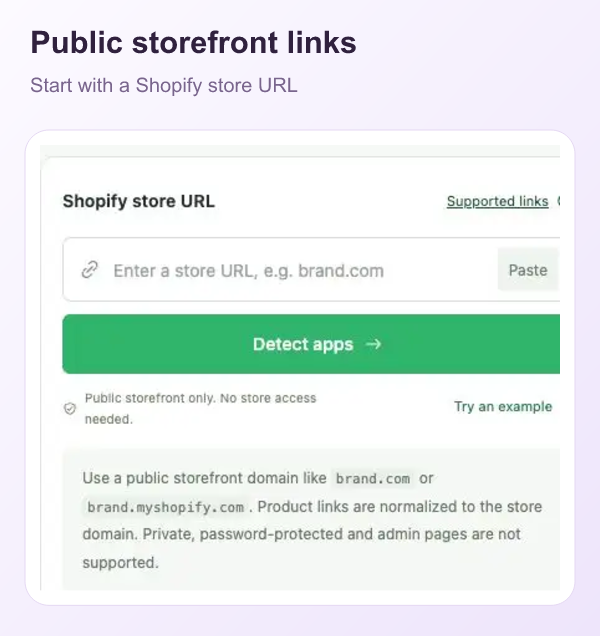
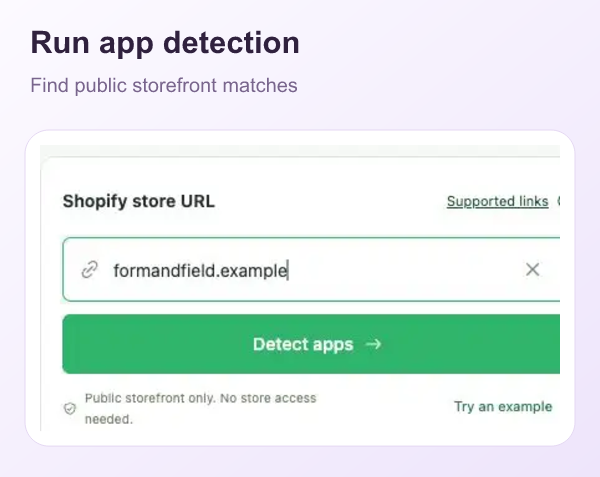
Select Detect apps in Shopify Apps Detector. Review the returned categories and confidence labels, then expand Why this match for the available explanation.
Search a name or filter a category in Shopify Apps Detector. Open an available app listing, check its fit and keep your shortlist in your own research notes.
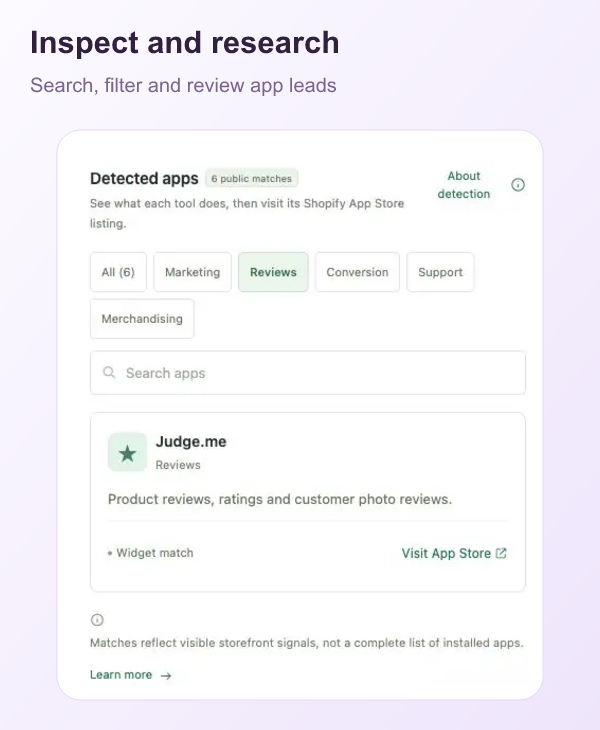
Use the Shopify Apps Detector to find a lead, inspect the listing, then check compatibility and setup with your team. Define a small customer-facing test before installation, and assess it with your own store data.
Workflow examples: six ways different roles could approach this research.

A media buyer could use Shopify Apps Detector to investigate tools around an ad’s destination and note which customer problem each might address.

A creative strategist could use Shopify Apps Detector to research a review feature before suggesting how a landing page might support the ad’s promise.

A brand lead could compare public app signals with Shopify Apps Detector, then ask the team to check whether the existing stack covers the same job.

An ecommerce founder could use Shopify Apps Detector to create a shortlist around one store issue and compare current app listings before testing.

An agency strategist could inspect Shopify Apps Detector match evidence and bring a focused app research question into a client discussion.

A researcher could use Shopify Apps Detector to search app names, group relevant leads and revisit the storefront before sharing a recommendation.
Practical answers for your store research.
Shopify Apps Detector looks for public storefront signals associated with apps and tools. Returned matches include available categories, confidence labels and supporting information.
Yes. MyAdLibrary’s Shopify Apps Detector is free. Enter a public Shopify store URL, run detection and use the results as leads for your app research.
Paste the public store address into Shopify Apps Detector and select Detect apps. Review the returned matches, expand their explanations and open available app listings.
A supported product link can be normalized to its store domain. Detection concerns the storefront’s public signals; it does not imply every page or app configuration has been inspected.
No. Shopify Apps Detector can identify public matches. Apps that leave no visible storefront signal, including backend tools, may not appear.
It describes the strength of the detection signal in Shopify Apps Detector. It does not certify that the app is active, correctly configured or responsible for a business result.
Yes. Public traces can remain after removal. Use Shopify Apps Detector to find research leads, then inspect the current storefront and listing before drawing a conclusion.
Yes. Shopify Apps Detector supports app-name search and category filtering. Use these controls to focus on the tools relevant to the feature or customer problem you are researching.
App detection and theme identification answer different questions. Use Shopify Store Analyzer for available theme context; an app match alone does not establish which theme a store uses.
No. Shopify Apps Detector does not measure an app’s contribution to revenue or conversion. Assess a proposed change with your own store data and a defined test.
The feature may come from the theme, custom code or an app whose signals are not recognized. An empty result does not establish that no apps are installed.
After using the Shopify Apps Detector, review current pricing, compatibility, permissions, support and setup effort. Confirm that the tool solves a real need in your own store.
Start with a store feature you want to understand. Run a free app check, inspect the evidence and choose the next tool to research.