
TL;DR
- Organize a Facebook and TikTok ad swipe file around the questions you will ask when writing a brief: source, advertiser, format, hook, offer, and CTA.
- Use MyAdLibrary's saved-ad grid to revisit Facebook references and open a card for its creative and details. Keep your own analysis in an accompanying sheet or brief.
- Keep one research record per distinct creative, with its source link, a specific observation, and an original test idea.
- For local media, keep the source identifier in the filename where available. Preserve the sequence of a carousel and distinguish meaningful variants from duplicate downloads.
- Review a small set before each brief and turn one observed pattern into an original test. Activity status and time running do not establish ad performance.
A collection becomes difficult to use when every saved item looks equally important. You remember an ad with a useful comparison, but its file is named download-final-2.mp4 and there is no source link. More folders alone will not recover the missing context.
This guide builds an organization workflow around real MyAdLibrary screens: browse the saved collection, open an ad, capture its details, and connect the reference to a working research index. If you are starting from scratch, read what an ad swipe file is first.
Start with a retrieval question
Choose the question before choosing labels. “Which references show an everyday problem before introducing the product?” gives you a reason to record the opening. “Which carousels explain an offer over several cards?” makes format and sequence important.
A practical starting set of questions is:
- Which advertiser and source does this reference come from?
- What happens first in the creative?
- What promise or offer does the copy make?
- What action does the CTA request?
- What could we test with our own product and evidence?
Use the same core fields across Facebook and TikTok. Keep platform and source separate: TikTok is a platform, while Creative Center Top Ads, the Commercial Content Library, and a public creator post describe different sources. Our TikTok source comparison explains that distinction.
Use the saved grid to find candidates
A populated MyAdLibrary Swipe File presents saved ads as visual cards. The example below includes several Facebook advertisers and more than one creative from the same advertiser.
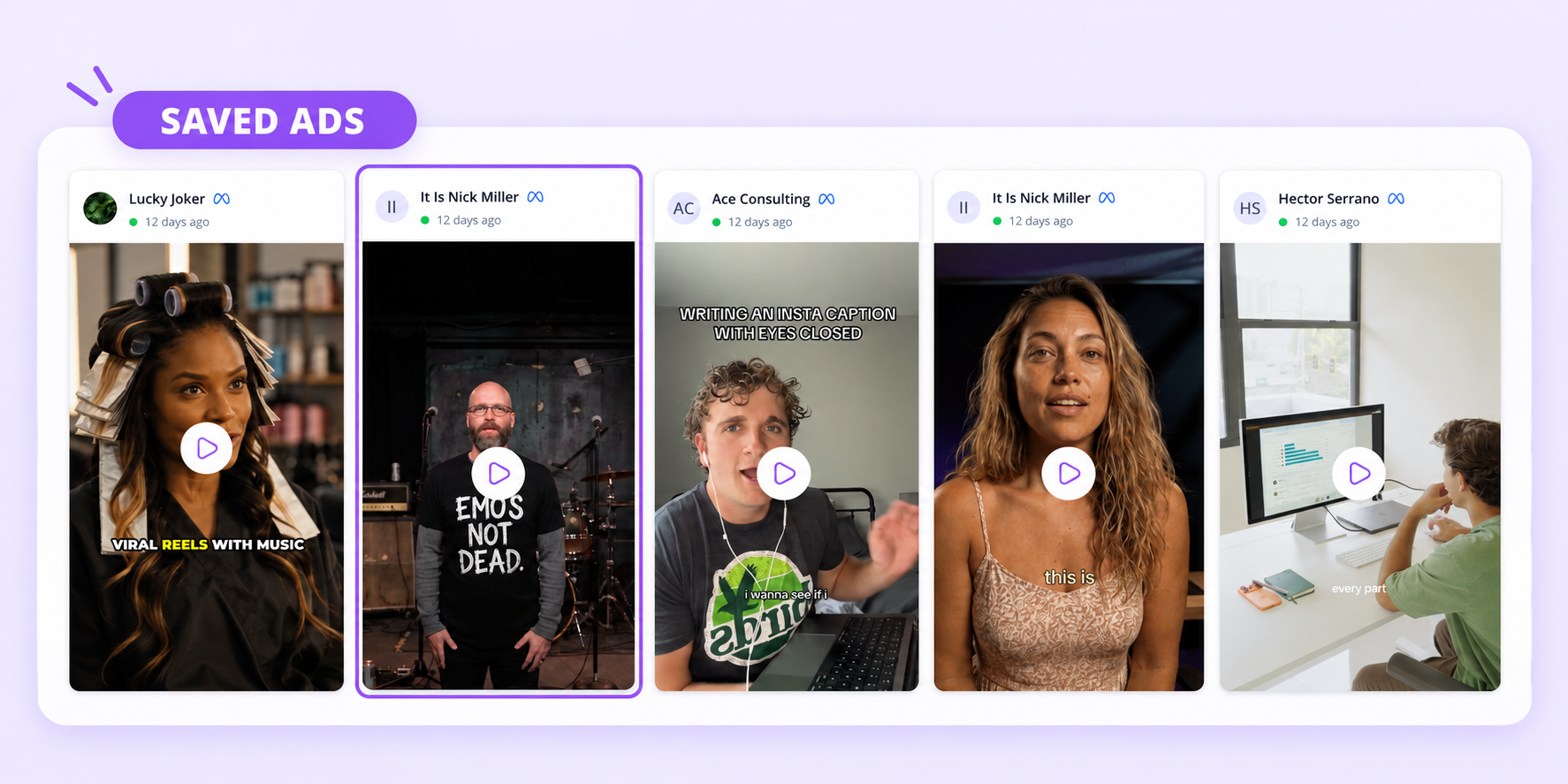
Use the brand and preview to locate a candidate, then open the card to inspect the actual creative and its context.
Do not merge two references just because the brand name matches. The cards may represent different openings, offers, lengths, or destinations. Equally, a different preview frame does not necessarily mean a different underlying video. Open the relevant cards before deciding whether they add distinct ideas.
The grid is a useful visual entry point; your accompanying index supplies the research labels described below. You can maintain that index in a spreadsheet or campaign document. Those labels are an editorial system you control, separate from the fields displayed by MyAdLibrary.
Capture facts from the detail view
Opening a card shows the creative alongside its details. In this saved Facebook example, the panel includes Brand, Ad ID, Ad Copy, Platform, CTA, Format, Landing Page, and Original Ad.
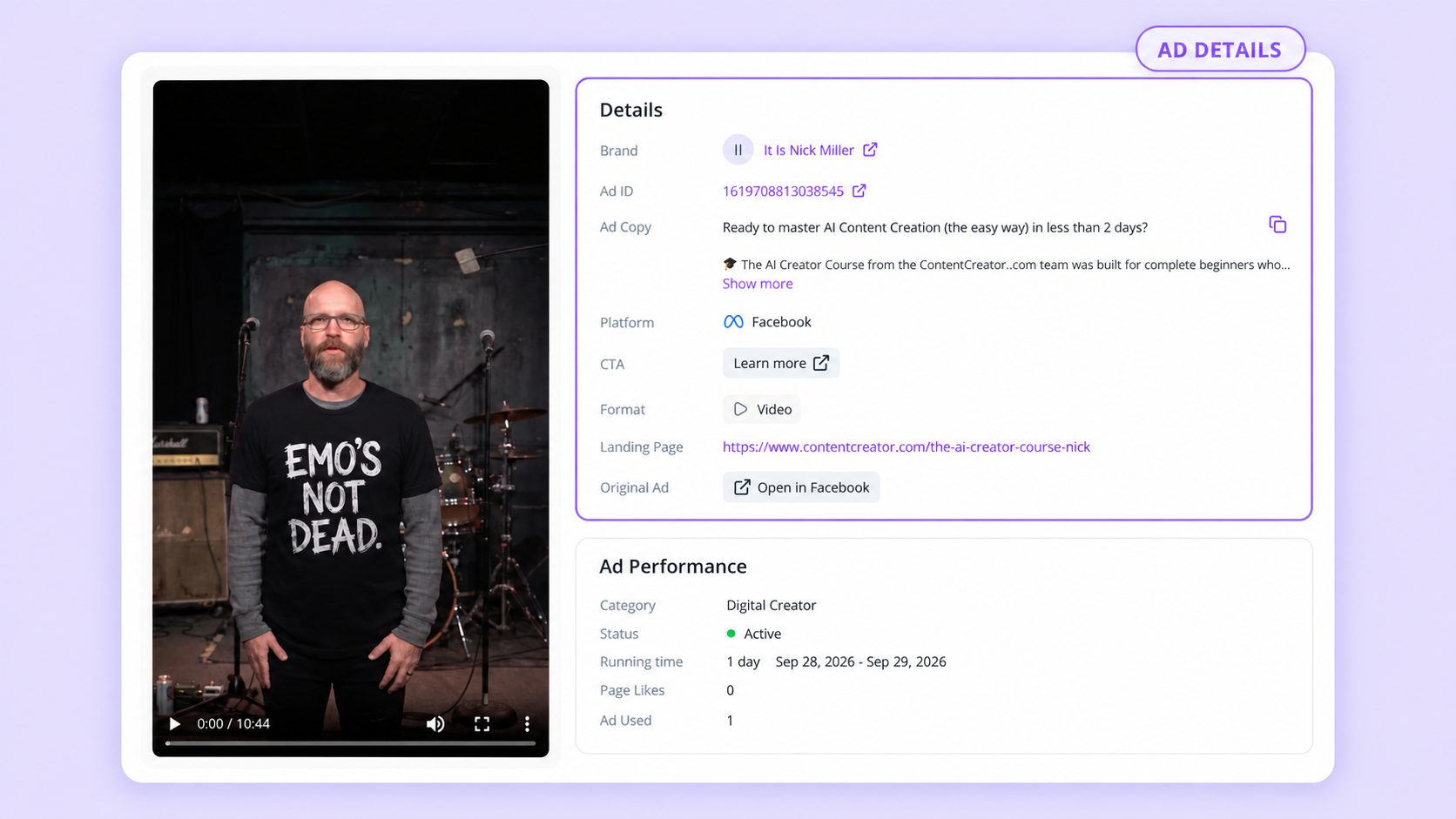
The example is a video from It Is Nick Miller. Read the copy and play the creative before adding your own interpretation.
Begin with information you can copy directly. Keep identifiers and URLs intact, expand truncated copy with Show more, and retain the original-ad link. Then add your analysis in separate columns so a teammate can tell which parts were observed and which parts are proposed.
| Field group | What to record | Example or rule |
|---|---|---|
| Source identity | Source, platform, advertiser, Ad ID or source identifier, original URL | The shown Facebook Ad ID is 1619708813038545. |
| Capture context | Date you saved or inspected it | Use your actual capture date, separate from the displayed running dates. |
| Creative facts | Format, written offer, CTA, landing page | The shown CTA is Learn more and the format is Video. |
| Observation | A specific visible or audible choice | “The written copy names beginners and includes a time-based promise.” |
| Test idea | A new execution for your own brief | “Test an audience-specific opening with a demonstration of our onboarding.” |
| Local reference | Filename or folder path, if downloaded | Keep it linked to the same source record. |
The detail panel also displays activity information such as status and running time. Record it only if it helps your research question, and treat it as context from that snapshot. A field under Ad Performance does not supply conversion results or prove that the creative is profitable.
Create a simple research record
Use a spreadsheet or campaign brief you already work in. Make one entry per source creative or meaningful variant, and keep these fields together:
- Source: platform, source library or post, advertiser, original URL, source identifier, and capture date.
- Creative: format, opening hook, offer, CTA, landing page, and local filename if you saved media.
- Analysis: one observation about what the creative actually does and one original idea to test.
If a field is unavailable, leave it blank or write unknown; do not infer a paid ad ID from an ordinary creator post. Store long platform identifiers as text in your spreadsheet so they are preserved exactly.
For the detail screenshot above, a useful partial entry would look like this:
| Column | Value based on the example |
|---|---|
| Platform / advertiser | Facebook / It Is Nick Miller |
| Ad ID | 1619708813038545 |
| Format / CTA | Video / Learn more |
| Offer | AI content-creation course; the visible copy addresses beginners. |
| Hook | Leave the video-opening label pending until you have watched it. |
| Observation | Written copy combines an audience cue with a time-based promise. |
| Test idea | Introduce our intended audience early, then demonstrate a specific task. |
This is enough to establish a useful research direction without inventing what happens in the video. The test idea is an editorial proposal, not a measured result or an endorsement of the original ad's promise.
Keep labels small and consistent
Begin with a short vocabulary that fits the work you actually do. For format, use video, image, or carousel. For hook, possible labels include question, problem, demonstration, comparison, and result-first. Add another label only when several relevant references genuinely need it.
Keep the opening separate from the offer. A comparison opening could lead to a discount, a free trial, a course, or no explicit promotion. Combining them into one label makes it harder to compare how similar creative approaches support different offers.
When an example fits multiple categories, choose one primary label and explain the nuance in the observation column. If you are studying video, watch the opening before labeling it. The accompanying ad copy and the first seconds of the video can use different hooks.
Save media and account entries deliberately
The free Facebook Ad Downloader and TikTok Ad Downloader provide local reference media from supported links. Retrieve a result, confirm that it matches the source, choose the appropriate download control, and open the saved file.
MyAdLibrary's Facebook Swipe File workflow uses the Chrome extension to save ads from Facebook Ad Library into your account. Sign in to Swipe File to revisit those entries. A successful local download is a separate outcome from seeing an ad in your saved collection.
For a TikTok reference, keep the original source URL with the local file in your index. The Facebook collection shown here does not establish that the same account-saving flow supports every TikTok source. Record what you actually used so someone else can follow the research path.
Keep carousel order intact
The Facebook result below is a ten-card carousel, with card two selected. Download slide 2 saves the selected asset, while Download all as zip is the control for the full set.
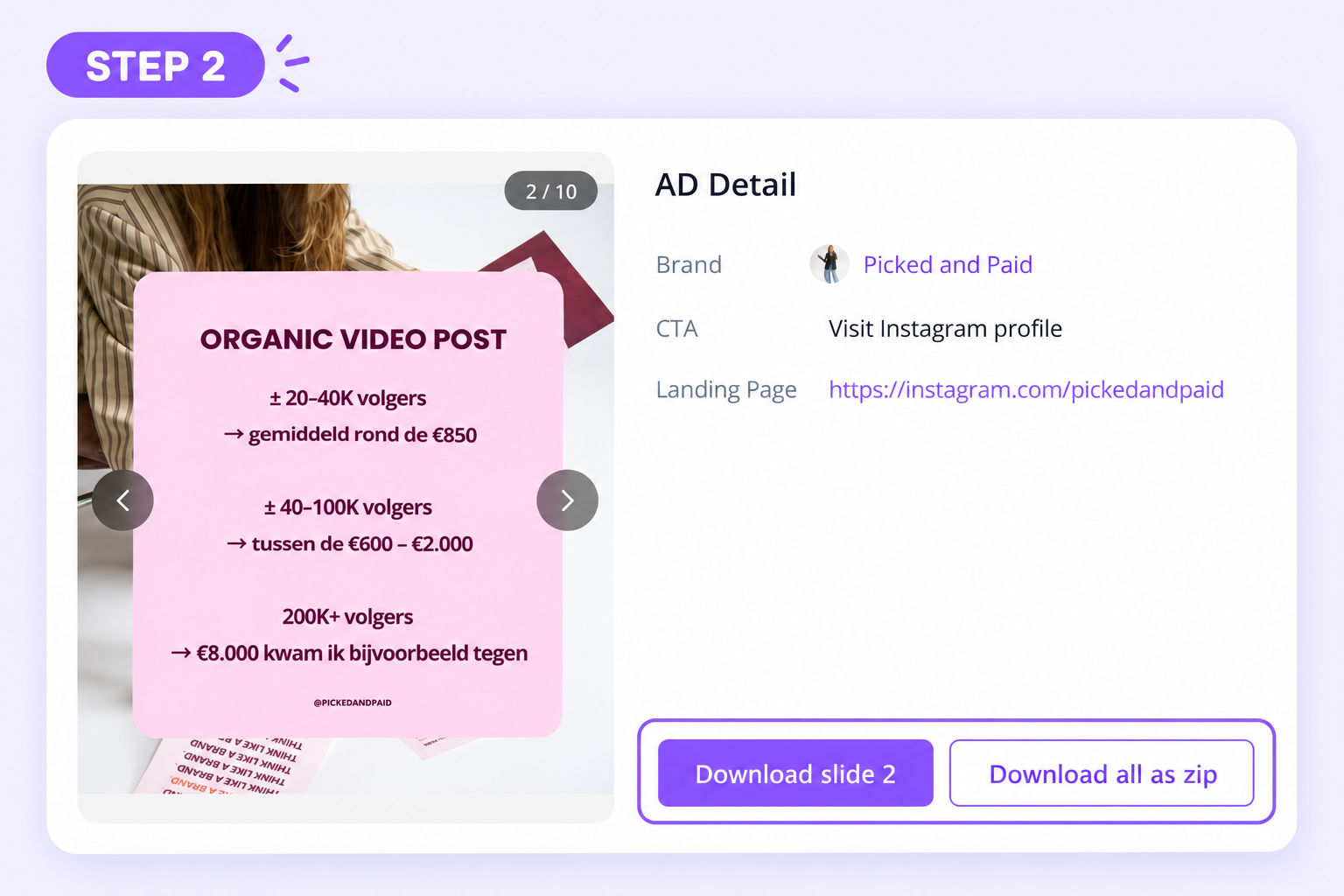
Choose the whole sequence when your research question concerns how the message develops across cards.
A single card is sufficient if you are studying its layout. It is insufficient if your note says the ad moves from a problem to proof to an offer: inspect the other cards before recording that sequence. Keep your source note beside the downloaded assets; do not assume the media ZIP includes the ad copy or your research context.
Give local files a stable name
One practical naming pattern is:
platform_advertiser_source-id_format_captured-date
For the carousel shown above, a folder could be facebook_picked-and-paid_920561980774167_carousel_2026-10-10. If you captured it on another date, use that date. Within the folder, preserve asset order with names such as slide-01, slide-02, and slide-03, retaining their actual file extensions.
For a public TikTok video, use its video identifier where available, without relabeling it as a paid ad ID. Avoid placing a changeable interpretation such as “winning hook” in the stable filename. Put the hook assessment in the sheet, where you can refine it after watching the full reference.
Decide what is a duplicate and what is a variant
Use source identity as the first check, then inspect the creative and copy. These decisions keep the collection compact while preserving useful differences:
| Situation | Suggested treatment |
|---|---|
| Same source ID and same media downloaded twice | Keep one working reference and consolidate the notes. |
| Same advertiser, different opening or offer | Keep both and describe the difference. |
| Same video with different written copy | Keep the source records distinct if the copy variation matters to your question. |
| Same creative found through two research sources | Link the source records; avoid counting them as two independent creative ideas. |
| Source link no longer opens | Retain the captured reference and date; mark current availability as unknown. |
Before removing a duplicate file, make sure the remaining copy opens and its source record is complete. A collection date or card position is not a reliable unique identifier.
Use the collection in a weekly review and a brief
A short recurring review is an editorial habit you can adapt to your workload. Start with the current campaign question, correct missing sources, merge duplicate downloads, and revisit entries with vague notes such as “great ad.” Replace each vague note with the particular creative choice worth studying.
Then choose two or three references that illuminate the same decision. If you are briefing an audience-specific opening, compare how each example establishes who it is for. Keep a reference that illustrates a different approach as a useful alternative.
Your brief can contain four compact parts:
- Question: What do we want the audience to understand immediately?
- Evidence: Which observed choices in the linked references address that question?
- Original execution: What will our script, imagery, and proof show?
- Test: Which opening will we compare, and which campaign outcome will we evaluate?
For the course-ad example, the observation concerns audience-specific copy. An original execution might show a first-time user completing one task in your own product. Any promise in that execution should follow your own evidence. Keep the reference as a rationale for a creative decision, with a direct link to the source.
FAQ
Should Facebook and TikTok references use separate folders?
They can share one index with consistent platform and source columns. Separate media folders can make file management easier; the shared index allows you to compare formats and ideas across sources.
Does MyAdLibrary automatically create these hook and offer labels?
The workflow in this guide uses a separate research sheet for those labels. MyAdLibrary's shown detail panel supplies source and creative information; your interpretation belongs in the accompanying record.
Why is my Swipe File empty after downloading a video?
Downloading saves local media. For Facebook account entries, use the extension-based saving workflow and open the correct signed-in account. An empty collection and a failed local download are different issues to investigate.
What if I only have time for a short note?
Keep the original link, advertiser, format, capture date, and one sentence on why the creative matters. Add the precise observation while the example is still fresh; a useful sentence is more valuable than several unexplained labels.
Make the next reference easy to retrieve
Start with one example in MyAdLibrary's Swipe File, capture its details in your research record, and write one original test idea. Your organization system is working when you can return from a brief question to the right creative, its source, and the reason you saved it.