
TL;DR
- Start with TikTok's Commercial Content Library when you need a public advertising record. Start with Creative Center Top Ads when you need selected creative examples to study.
- TikTok documents the Commercial Content Library's current ad coverage as the EEA, Switzerland, and the UK. Top Ads is an advertiser-authorized selection, not a complete inventory of all campaigns.
- Once you have a supported individual link, MyAdLibrary's free TikTok Ad Downloader provides a paste-link, inspect-result, save-media workflow.
- On a video result, Download Video saves motion and sound; Download Cover saves the still cover. Retain the original source separately.
- A returned video, a visible ad record, or a Top Ads placement does not tell you the advertiser's profit. Record what you can observe and use it to plan an original creative test.
The choice of source changes what you can conclude from the example you find. A strategist looking for a stronger opening needs a different research path from someone documenting an advertiser's public record. Choose that path first, then save the useful creative with its context.
TikTok Ad Library and Creative Center at a glance
“TikTok Ad Library” is sometimes used loosely in marketing guides. In this article it means the Ad Library within TikTok's Commercial Content Library, available at library.tiktok.com. Top Ads is a feature within Creative Center.
| Decision | Commercial Content Library | Creative Center Top Ads |
|---|---|---|
| Main purpose | Inspect public commercial-content records. | Study selected advertising creatives. |
| Starting question | “Can I locate this advertiser's record?” | “How do other ads handle this creative problem?” |
| Documented scope | Ad coverage for the EEA, Switzerland, and UK. | Advertiser-authorized examples with region, industry, and objective filters. |
| Context to retain | Advertiser identity, dates, and the record URL. | Selected filters, the example URL, and the creative moment you studied. |
| Best next action | Check the individual record against your research question. | Turn an observed technique into a testable idea. |
TikTok's Commercial Content Library help page explains its two parts: paid ads and other disclosed commercial content. Its About Top Ads documentation describes an authorized selection of high-performing creatives and the available performance views. These descriptions were reviewed in October 2026; check the source for changes to coverage or access.
Choose a source by the decision you need to make
When you need an advertiser record
Start with the Commercial Content Library. Search with the advertiser information you have, then inspect a relevant individual record. Keep the record URL and visible advertiser identity together. If the name differs from the name you expected, resolve that before attributing the creative to a competitor.
Your research note should state what the record establishes and what remains unknown. For example: “Found a public record for this advertiser in the selected market; saved the record link and visible dates.” That is more useful than “This brand is spending heavily,” which requires evidence the record may not provide.
If you cannot find the brand, reconsider your market, date selection, spelling, and the library's coverage. A missing result is a reason to check those conditions. It is not sufficient evidence that the brand has never advertised.
When you need a creative reference
Start with Creative Center Top Ads and a narrow question such as “How can a product comparison become clear in the opening shot?” Keep the region and industry relevant to your intended audience, then look at several examples under the same conditions.
TikTok's Top Ads documentation describes video performance views that can help you inspect engagement moments. Treat any visible metric in its platform context. A useful editorial note still needs to describe the actual creative: what appears on screen, what the viewer is asked to believe, and where the product demonstration begins.
Avoid collecting examples simply because their totals look large. A longer video and a short direct-response ad may have different jobs. Select references for the decision they help you make, and record the filters you used so the collection has a clear scope.
A repeatable research sequence
- Write the question. Choose an advertiser-record question or a creative-technique question before opening a source.
- Choose comparable conditions. Record the market, category, date selection, or other filters you use.
- Open an individual item. Preserve its direct link instead of only the address of a changing results page.
- Inspect the creative. Confirm the advertiser or creator, play the video, and note the specific moment worth revisiting.
- Save a supported reference. Use the downloader when it can retrieve the individual source; preserve the original research link even if you also have a public video link.
- Write the observation. Add one sentence about what to test in your own creative, with uncertainty recorded where needed.
The value comes from the connection between the research question and the saved example. Ten files from unrelated sources will be harder to use than three references collected against the same brief.
How to use the free TikTok downloader
The following screenshots show a concrete input and result in MyAdLibrary's TikTok Ad Downloader. The example uses a public tiktok.com/@.../video/... address. It demonstrates the downloader interaction; that URL alone does not establish that the clip is a paid ad or that it came from either official research library.
1. Paste the individual link
Open the downloader and paste the complete URL into its main field. If the link came from a chat or a research note, reopen it first and check that it still leads to the intended item. Avoid using an account profile, a search page, or a copied address with missing characters.
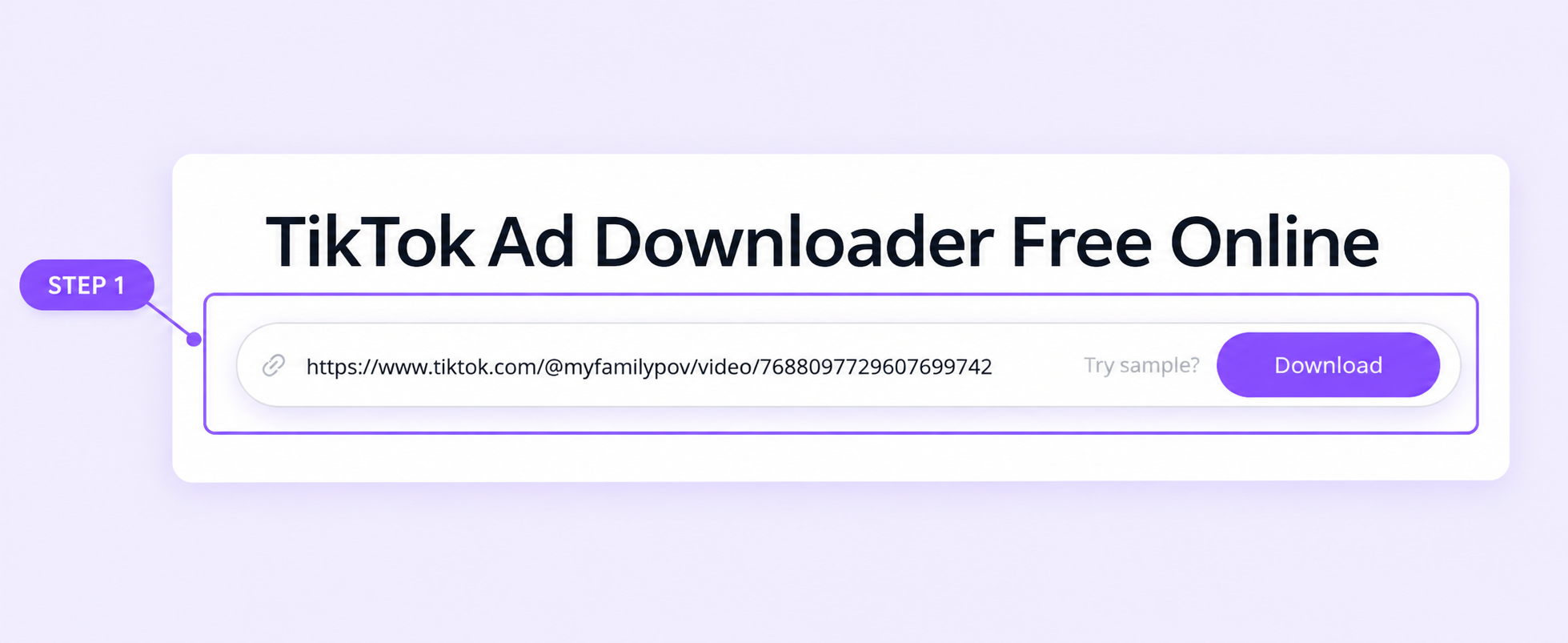
The example input identifies one public TikTok video. Keep the source-library record too when your research began in CCL or Top Ads.
Select Download beside the field. This retrieves the result card; you will choose which file to save from the controls in that result. If you used Try sample? to explore the page, check that your own URL has replaced the sample before continuing.
2. Inspect the returned video and details
The supplied result displays a video preview on the left and AD Detail on the right. It includes a Brand field showing Josh Morris, visible copy about a lawn sweeper, and separate media buttons. The player shows a 48-second clip in this example.
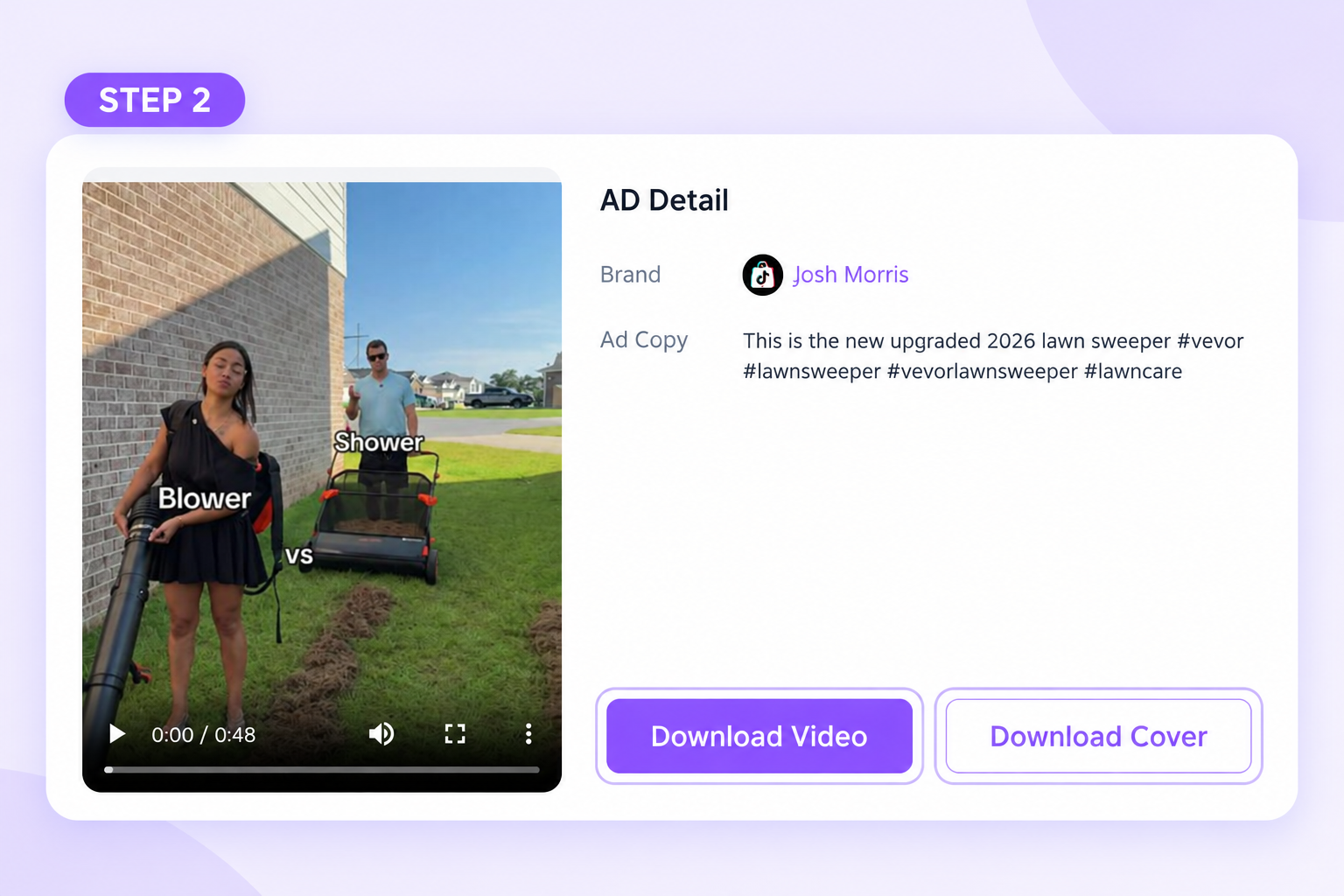
The result screen shows the returned media and available actions. Opening the saved file remains the check that the download completed on your device.
Compare the preview with the source before saving. A display name may differ from the account handle in the URL; preserve both when that distinction matters. The result's Brand field is a useful attribution clue, but it is not a substitute for the advertiser identity in an official ad record.
3. Choose video or cover
Select Download Video when you want to study pacing, spoken delivery, demonstrations, or the sequence of shots. Select Download Cover when you want a still thumbnail for your reference index. You may need both, but they answer different research needs.
After the download completes, open the video from your browser's downloads list. Confirm that it plays, that the relevant section is present, and that the file belongs to the expected reference. Store the cover with the same reference name so it is not mistaken for another creative later.
Keep any visible copy and source details in an accompanying note. Do not assume that a media download automatically preserves the full research record, creates an account entry, or includes every field shown by TikTok's original source.
Turn the result into a useful creative observation
The result screenshot gives a small but concrete example of how to take notes. Its visible opening contrasts two lawn-care approaches. That supports an observation about the frame's comparison setup; a single screenshot does not show the later demonstration or establish whether the promotion converted viewers.
A useful note might read:
Observed: The visible opening puts two approaches side by side. Question to investigate: How quickly does the video demonstrate the difference? Original test idea: Compare two familiar approaches to our own product's task, then show evidence the audience can evaluate.
After watching the full clip, add timestamps for the hook, demonstration, and CTA. If the expected CTA or offer is absent, write that down. “No explicit offer observed” is more useful than filling a blank with a guess.
For each saved reference, keep this compact record:
| Field | What to write |
|---|---|
| Source | CCL, Creative Center Top Ads, or a public creator video; use the actual source. |
| Identity | Visible advertiser or creator and the account handle when relevant. |
| Links | Research-record URL and the individual media link, if different. |
| Capture context | Date and the source filters used. |
| Creative observation | Hook, demonstration, offer, CTA, and useful timestamps. |
| Next test | One original execution idea based on the observation. |
The ad swipe file introduction explains the collection habit. The Facebook and TikTok organization guide shows how to use consistent fields across platforms in an accompanying index.
Common source and download problems
| Problem | Practical next step |
|---|---|
| A brand is missing from CCL | Recheck identity, market, dates, and documented coverage. |
| A creative is missing from Top Ads | Remember that it is a selected collection; look for a suitable alternative reference. |
| A source asks for login | Follow the source's access flow, or use the information publicly available to you. |
| The downloader cannot retrieve the link | Confirm that the original item still opens and that you copied an individual supported URL. |
| You downloaded a still image | Select Download Video rather than Download Cover on a video result. |
| The preview appears but the save fails | Check the browser's downloads status and retry the relevant media action. |
| Two files seem to show the same clip | Compare links and creative content before creating two separate research entries. |
FAQ
Which source is better for writing a new ad brief?
Start with the source that helps answer the brief's question. Top Ads is usually the more direct inspiration route; a public record is useful when advertiser context is central. Use both when they answer different parts of the same question.
Does downloading a TikTok video prove it was an ad?
No. A public creator-video URL and a returned media file establish a video reference. Identify a paid-ad record separately if your analysis depends on paid placement.
Is MyAdLibrary's TikTok downloader free?
Yes. The browser tool provides a free starting point for supported links. Use the result's video and cover controls, then keep the source information with the files.
Should I call every saved example a winning ad?
No. Describe what you observed and why it is useful. Public visibility and selected performance signals do not establish the economics of another advertiser's campaign.
Choose the source, then keep the lesson
Start with one research question, find an appropriate example, and save it with the free TikTok Ad Downloader in MyAdLibrary. A useful reference includes the creative, its source, and an original idea to test. That is the bridge from browsing to a better brief.